1. Tableau Desktop and Web Authoring Help
"Optimize Workbook Performance":
Section: "Filter efficiently" -> "Filter by creating a discrete field"
Content: "When you filter on a continuous date
you can select a range of dates
which requires a database query. But if you filter on a discrete date
you can select specific dates
which is a more efficient query." This directly supports the principle behind replacing a continuous date filter with a discrete one (like YEAR) to improve query performance.
2. Tableau Whitepaper
"Designing Efficient Workbooks":
Section: "Filters" (typically found under "Data Source and Query Performance")
Content: The document emphasizes that filters on discrete fields with lower cardinality (like years) tend to perform better than filters on continuous fields with high cardinality (like a full date range). This is because the resulting query is simpler and can be processed more quickly by the underlying data engine (Hyper
in this case).
3. Tableau Desktop and Web Authoring Help
"Table Calculations: Addressing and Partitioning":
Section: "Performance"
Content: This documentation explains that table calculations like TOTAL() and WINDOWSUM() operate on the table of aggregated data that has been returned to Tableau. Since they are post-query calculations
optimizing them does not resolve a bottleneck in the "Executing Query" phase. This confirms why options C and D are incorrect.

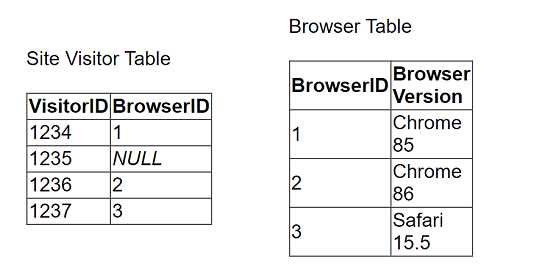 The client uses "Some Records Match" for the Referential Integrity setting because a match is not
guaranteed. The client wants to improve the performance of
the dashboard while also getting an accurate count of site visitors.
Which modifications to the data tables and join should the consultant recommend?
The client uses "Some Records Match" for the Referential Integrity setting because a match is not
guaranteed. The client wants to improve the performance of
the dashboard while also getting an accurate count of site visitors.
Which modifications to the data tables and join should the consultant recommend?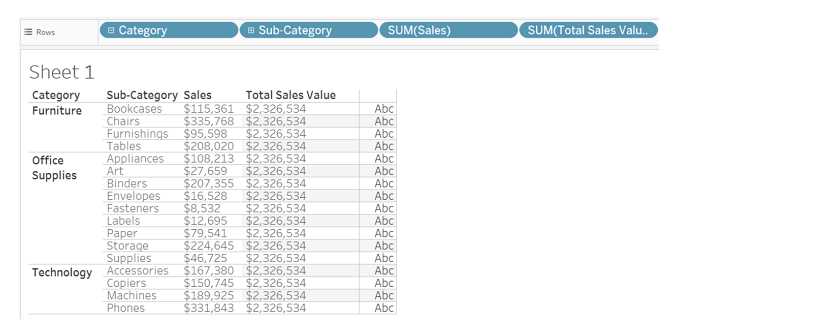 Which method will produce the output for the Total Sales Value field for all the categories shown in
the table?
Which method will produce the output for the Total Sales Value field for all the categories shown in
the table?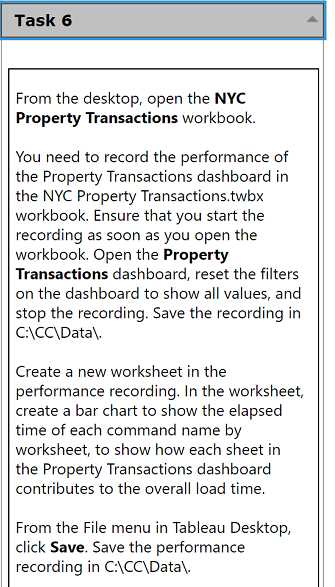 From the desktop, open the NYC Property Transactions workbook. You need to record the performance of the Property Transactions dashboard in the NYC Property Transactions.twbx workbook. Ensure that you start the recording as soon as you open the workbook. Open the Property Transactions dashboard, reset the filters on the dashboard to show all values, and stop the recording. Save the recording in C:\CC\Data\. Create a new worksheet in the performance recording. In the worksheet, create a bar chart to show the elapsed time of each command name by worksheet, to show how each sheet in the Property Transactions dashboard contributes to the overall load time. From the File menu in Tableau Desktop, click Save. Save the performance recording in C:\CC\Data\.