1. Tableau Official Documentation
"Create Level of Detail Expressions in Tableau": This document explains the core purpose of LOD expressions. It states
"Level of detail expressions allow you to compute values at the data source level and the visualization level... you can compute aggregations that are not at the level of detail of the visualization." The FIXED keyword is shown to compute a value using only the specified dimensions.
Source: Tableau Help
https://help.tableau.com/current/pro/desktop/en-us/calculationscalculatedfieldslod.htm
2. Tableau Official Documentation
"FIXED Level of Detail Expressions": This page provides a specific example similar to the question. It shows calculating a sum for a region while the view contains states. The syntax {FIXED [Region] : SUM([Sales])} is used to compute the sum of sales at the region level
which is then displayed for each state within that region.
Source: Tableau Help
https://help.tableau.com/current/pro/desktop/en-us/calculationscalculatedfieldslodfixed.htm
Section: "Example 1".
3. Tableau Official Documentation
"Table Calculation Functions": This document details how table calculations
including window functions
operate. It clarifies that these functions compute based on the "virtual table" of data in a visualization
making them dependent on the dimensions present in the view
unlike FIXED LODs.
Source: Tableau Help
https://help.tableau.com/current/pro/desktop/en-us/functionsfunctionstablecalculation.htm
Introduction paragraph.

 Which method will produce the output for the Total Sales Value field for all the categories shown in
the table?
Which method will produce the output for the Total Sales Value field for all the categories shown in
the table?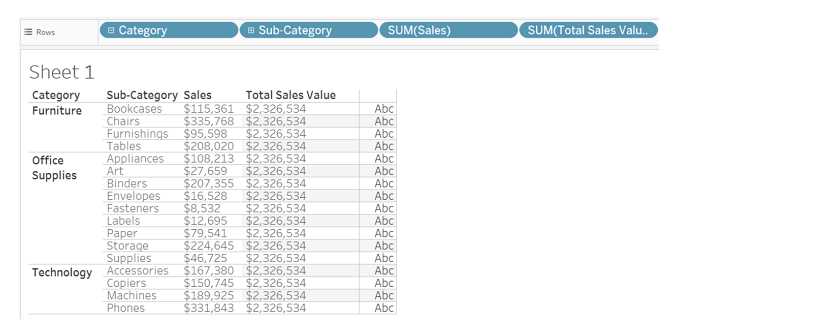 Which method will produce the output for the Total Sales Value field for all the categories shown in
the table?
Which method will produce the output for the Total Sales Value field for all the categories shown in
the table?