
Q: 11
SIMULATION From the desktop, open the CC workbook. Use the US Population Estimates data source. You need to shape the data in US Population Estimates by using Tableau Desktop. The data must be formatted as shown in the following table. 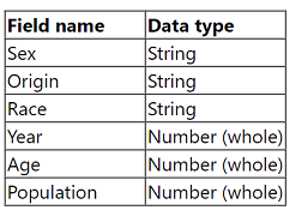 Open the Population worksheet. Enter the total number of records contained in the data set into the Total Records parameter. From the File menu in Tableau Desktop, click Save.
Your Answer
Discussion
No comments yet. Be the first to comment.
Be respectful. No spam.
