This question always bugs me, Azure's UI never makes it obvious. Pretty sure it's C since Split Data literally does what they're asking for, but if they'd said you need to build a dataset from pieces I'd hesitate. Anyone think B could be right in some edge case?
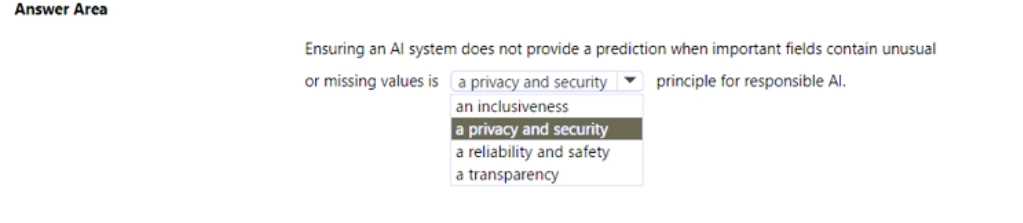
HOTSPOT Select the answer that correctly completes the sentence 
Looks like reliability and safety is the better match here. Privacy/security feels tempting, but for missing or weird data fields these questions usually want the system to avoid unsafe predictions, so safety comes first I think. Anyone see it differently?
Reliability and safety fits best. Privacy/security is tempting but in scenarios with missing or weird data, the exam usually tests for reliability first. I think some might mix it up with privacy, but not here.
Reliability and safety fits best here since the system refuses to predict when inputs are sketchy or incomplete. That prevents bad or harmful results, which is kind of the whole point of that principle. Transparency is important too but doesn't quite cover this specific "fail-safe" behavior, I think. Open to other views though.
Pretty sure it's A and B. Had something like this in a mock and remember needing Enterprise for both GUI-based AutoML (A) and for setting up the compute instance as a workstation (B). C felt more optional, but not 100%. Agree?
I don't think B or D require Enterprise. Historically, only the GUI-based stuff like in A and C (AutoML GUI and the ML Designer) needed an Enterprise workspace. Create compute and upload datasets were always in basic too, even if it feels like they should be advanced. Pretty sure exam questions stick to that old difference, but happy to hear another read on it!
HOTSPOT brectly completes the sentence.
I've seen a similar question and image classification can sometimes be picked if they're just asking for identifying the type of content, not converting text. Pretty sure that's what they want here but happy to hear if someone got a different result in practice.
HOTSPOT Select the answer that correctly completes the sentence.
Yep, for showing distributions and stats in the designer, it's Dataset output visualization feature. You right-click the dataset and pick Visualize to see all those summary details. Normalize Data would just change values but not actually show you distributions. I think this is solid, but let me know if anyone's seen different wording elsewhere.
DATASET OUTPUT VISUALIZATION FEATURE
This one specifically lets you right-click and see histograms, counts, unique values etc for each column in the dataset. Normalize Data doesn't show those stats, it just changes the data. Pretty sure this is what they're after here.
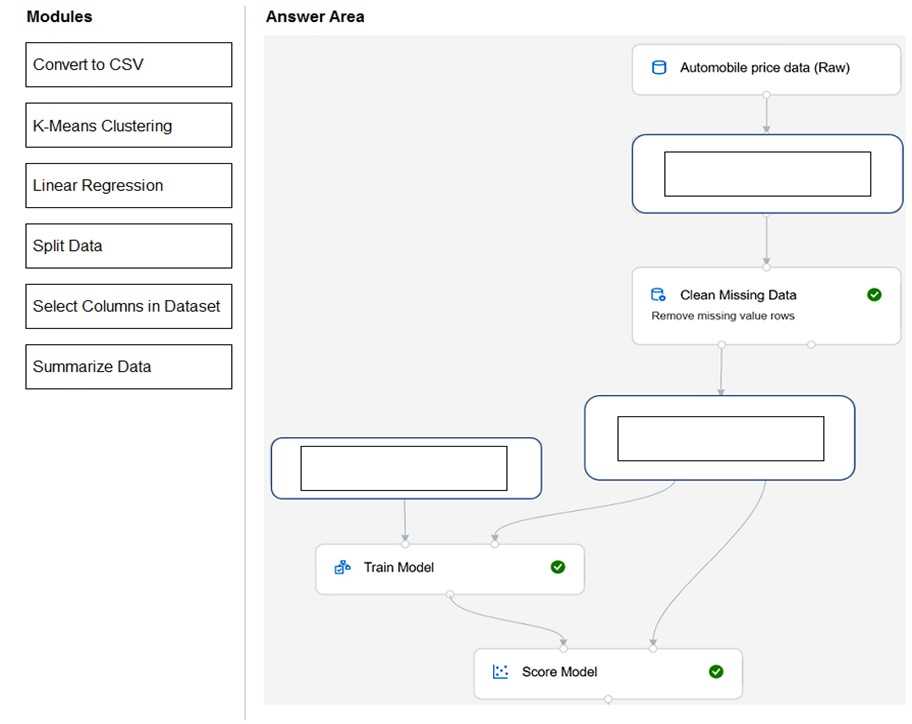
DRAG DROP You need to use Azure Machine Learning designer to build a model that will predict automobile prices. Which type of modules should you use to complete the model? To answer, drag the appropriate modules to the correct locations. Each module may be used once, more than once, or not at all. You may need to drag the split bar between panes or scroll to view content. NOTE: Each correct selection is worth one point.
I remember a similar scenario from labs, in practice sets. For predicting price (a number), you'd map like this: Select Columns in Dataset to Automobile price data (Raw), Split Data to Clean Missing Data, and Linear Regression to Before Train Model. That's the standard flow for regression models in Azure ML designer. I think this is right but open to correction if anyone spots a better sequence!
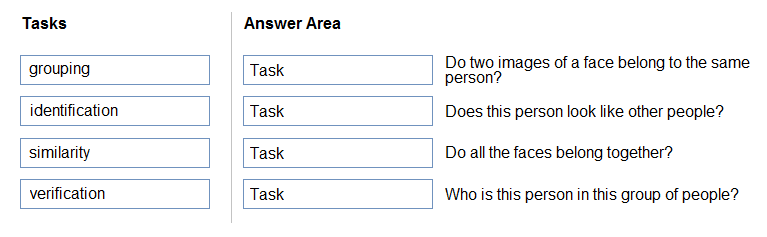
DRAG DROP Match the facial recognition tasks to the appropriate questions. To answer, drag the appropriate task from the column on the left to its question on the right. Each task may be used once, more than once, or not at all. NOTE: Each correct selection is worth one point.
I'm pretty sure that's right since grouping is clustering (trap is confusing similarity and grouping), but if anyone thinks otherwise let me know.
Seen similar in some practice sets and official docs. It's: verification → Do two images of a face belong to the same person, similarity → Does this person look like other people, grouping → Do all faces belong together, identification → Who is this person in this group. If you're reviewing, check official guide for these terms.
Pretty straightforward if you’ve seen these terms before. "Do two images of a face belong to the same person?" is verification, since it’s checking 1:1. "Does this person look like other people?" maps to similarity. Grouping is clustering unknowns, so that fits with "Do all the faces belong together?". Finally, "Who is this person in this group of people?" is classic identification. I’m fairly sure these are what MS expects here, but open to correction if I missed anything!
- Do two images of a face belong to the same person? → verification
- Does this person look like other people? → similarity
- Do all the faces belong together? → grouping
- Who is this person in this group of people? → identification
I don’t think B is right this time, I’d pick A. Abuse monitoring can flag hateful content as it comes up and block it from being returned. Content filtering is useful too, but abuse monitoring seems more direct here. Anyone see reports where A covers this better?
HOTSPOT To complete the sentence, select the appropriate option in the answer area.