
DRAG DROP You need to use Azure Machine Learning designer to build a model that will predict automobile prices. Which type of modules should you use to complete the model? To answer, drag the appropriate modules to the correct locations. Each module may be used once, more than once, or not at all. You may need to drag the split bar between panes or scroll to view content. NOTE: Each correct selection is worth one point. 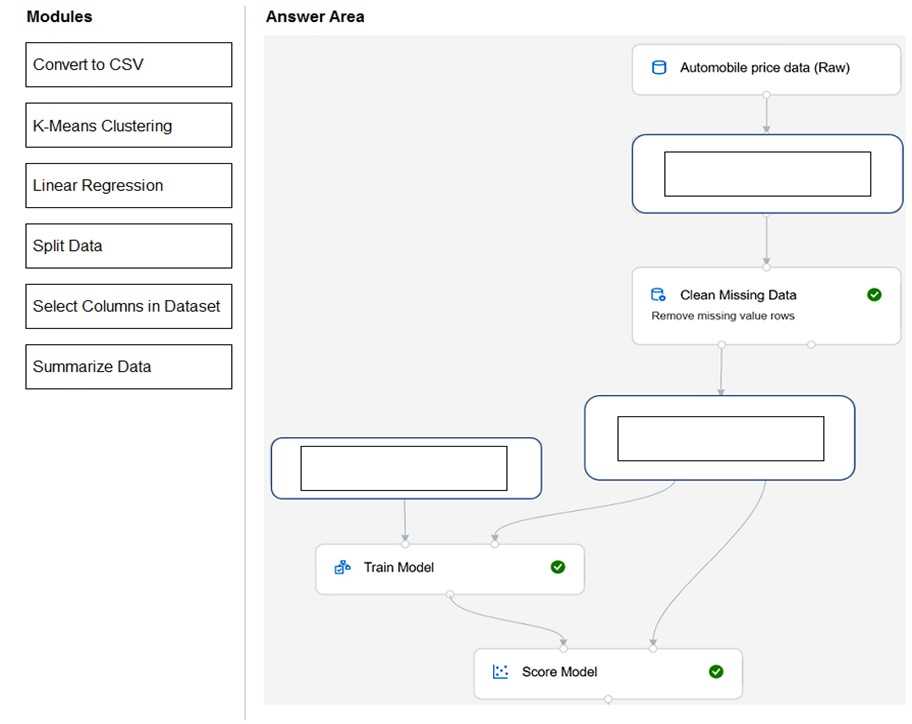
I remember a similar scenario from labs, in practice sets. For predicting price (a number), you'd map like this: Select Columns in Dataset to Automobile price data (Raw), Split Data to Clean Missing Data, and Linear Regression to Before Train Model. That's the standard flow for regression models in Azure ML designer. I think this is right but open to correction if anyone spots a better sequence!
