Free ADA-C01 Practice Test Questions and Answers (2026) | Cert Empire Practice Questions
Free preview: 20 questions.
📖 About this Domain
This domain covers the administration of Snowflake accounts, focusing on cost management and data lifecycle protection. It details features for business continuity, disaster recovery, and secure data collaboration.
🎓 What You Will Learn
- You will learn to configure account parameters and resource monitors to control virtual warehouse credit consumption.
- You will learn to implement data protection features like Time Travel and Fail-safe for data recovery.
- You will learn to use zero-copy cloning for instant data copies and Secure Data Sharing for provider-consumer collaboration.
- You will learn to configure account replication and manage failover/failback for business continuity.
🛠️ Skills You Will Build
- You will build skills to manage data retention periods and recover objects using Time Travel and the UNDROP command.
- You will build skills to implement cost controls by creating and assigning resource monitors to warehouses.
- You will build skills to configure database replication and failover groups to ensure high availability.
- You will build skills to create and manage secure shares to provide data access to consumer accounts.
💡 Top Tips to Prepare
- Master the distinction between Time Travel and Fail-safe, including their retention periods and associated storage costs.
- Practice the syntax for creating and altering resource monitors, including setting triggers and actions like SUSPEND.
- Understand the object types included in account replication and the specific SQL commands for failover and failback.
- Know the differences between standard, transient, and temporary tables and how they affect data protection features.
📖 About this Domain
This domain covers Snowflake's Secure Data Sharing architecture, which allows live data sharing between accounts without data movement. It details the roles of data providers and consumers, the mechanics of shares, and the function of the Snowflake Marketplace.
🎓 What You Will Learn
- Differentiate between data providers and consumers and the SQL commands used to create and manage shares.
- Understand the configuration and use cases for reader accounts versus sharing with full Snowflake accounts.
- Explore the process of publishing data via listings on the Snowflake Marketplace and consuming data from it.
- Learn how to create a database from a share and the implications for querying shared, immutable data.
🛠️ Skills You Will Build
- Executing DDL and DCL to create shares, grant object privileges, and add consumer accounts.
- Administering inbound shares as a consumer by creating databases from them for immediate querying.
- Managing reader accounts, including provisioning, monitoring credit usage, and object access.
- Implementing data sharing strategies using direct shares, private listings, or the public Snowflake Marketplace.
💡 Top Tips to Prepare
- Memorize the specific privileges that can be granted on database objects to a share.
- Master the differences in setup and cost implications between reader accounts and full consumer accounts.
- Practice the end-to-end workflow for both a provider creating a share and a consumer creating a database from that share.
- Understand the role of metadata in Secure Data Sharing and why it enables instant, no-copy data access.
📖 About this Domain
This domain covers Snowflake's multi-layered security framework, focusing on user authentication and access control. It emphasizes the implementation of Role-Based Access Control (RBAC) and other security features to protect data at rest and in transit.
🎓 What You Will Learn
- Implement and manage network policies, user authentication, and multi-factor authentication (MFA).
- Design and implement a robust Role-Based Access Control (RBAC) hierarchy using roles, users, and grants.
- Utilize advanced security features like dynamic data masking, row access policies, and object tagging for granular data protection.
- Understand Snowflake's security principles, including managed and customer-managed keys for encryption.
🛠️ Skills You Will Build
- Construct a scalable RBAC model by creating custom roles and granting privileges on securable objects.
- Configure network policies to restrict access based on IP addresses and manage federated authentication (SSO).
- Apply dynamic data masking and row access policies to tables and views for sensitive data protection.
- Audit security configurations and user access using system views and functions like LOGIN_HISTORY.
💡 Top Tips to Prepare
- Master the concept of role hierarchy and privilege inheritance, including the MANAGE GRANTS privilege.
- Practice creating and applying network policies, row access policies, and masking policies in a test environment.
- Understand the differences and use cases for the ACCOUNTADMIN, SYSADMIN, and SECURITYADMIN default roles.
- Review the syntax for GRANT and REVOKE commands for different object types and future grants.
📖 About this Domain
This domain focuses on analyzing and improving Snowflake performance. It covers the tools and techniques for identifying query bottlenecks, optimizing virtual warehouse utilization, and applying data clustering strategies. You will learn to use Snowflake's monitoring features to ensure efficient resource consumption.
🎓 What You Will Learn
- How to use the Query Profile to analyze query execution plans and identify performance issues like disk spilling or inefficient joins.
- The different types of caching in Snowflake, including the result cache and local warehouse cache, and how they impact query performance.
- Strategies for virtual warehouse tuning, such as scaling up for query complexity and scaling out for concurrency using multi-cluster warehouses.
- Methods for monitoring credit consumption and performance trends using Account Usage views like QUERY_HISTORY and WAREHOUSE_METERING_HISTORY.
🛠️ Skills You Will Build
- Diagnosing and resolving slow-running queries by interpreting the query execution plan and operator statistics.
- Implementing effective data clustering strategies by selecting appropriate clustering keys to reduce table scan times.
- Configuring and managing virtual warehouses for optimal price-performance, including setting auto-suspend and auto-resume parameters.
- Applying advanced performance features like the Search Optimization Service and materialized views for specific query workloads.
💡 Top Tips to Prepare
- Gain hands-on experience with the Query Profile, focusing on identifying operators that cause disk spilling and partition pruning effectiveness.
- Practice querying the SNOWFLAKE.ACCOUNT_USAGE schema to build your own performance monitoring dashboards and alerts.
- Understand the distinct scenarios for when to scale up a warehouse versus when to use a multi-cluster warehouse for scaling out.
- Memorize the impact of different DML operations on micro-partitions and how clustering metadata is maintained or affected.
📖 About this Domain
This domain focuses on the methods for moving data into and out of Snowflake. It covers bulk data loading using the COPY command and continuous data ingestion with Snowpipe. Key topics include stages, file formats, transformation during load, and troubleshooting data movement.
🎓 What You Will Learn
- Learn to execute bulk data loads using the COPY INTO
command from internal and external stages.
- Understand how to configure Snowpipe for automated, continuous micro-batch data ingestion from cloud storage.
- Master the process of unloading data from Snowflake tables to stages using the COPY INTO command.
- Explore data loading considerations, including file sizing, parallelization, and error handling using copy options.
🛠️ Skills You Will Build
- You will build the ability to create and manage stage objects and file format objects for various data types.
- You will gain proficiency in transforming data during the loading process using a SELECT query within the COPY command.
- You will develop skills to monitor and troubleshoot data loading activities by querying the COPY_HISTORY and PIPE_USAGE_HISTORY views.
- You will learn to implement data validation strategies using the VALIDATION_MODE copy option before committing a load.
💡 Top Tips to Prepare
- Practice using different COPY options like ON_ERROR, PURGE, and MATCH_BY_COLUMN_NAME to handle various loading scenarios.
- Gain hands-on experience by setting up a Snowpipe with auto-ingest notifications on a cloud storage provider (S3, GCS, Azure Blob).
- Understand the best practices for data file preparation, specifically file splitting strategies to optimize parallel loading by a virtual warehouse.
- Review the privileges required for different data loading and unloading operations, including for stages, file formats, and target tables.
Snowflake ADA C01
View ModeQ: 1What Snowflake capabilities are commonly used in rollback scenarios? (Select TWO).OptionsDiscussionNo comments yet. Be the first to comment.Be respectful. No spam.Q: 2. Company A uses Snowflake to manage audio files of call recordings. Company A hired Company B, who also uses Snowflake, to transcribe the audio files for further analysis. Company A's Administrator created a share. What object should be added to the share to allow Company B access to the files?OptionsDiscussionNo comments yet. Be the first to comment.Be respectful. No spam.Correct Answer:BExplanationTo securely share unstructured data stored in a stage, the provider must not grant direct access to the stage itself. Instead, access is provided through temporary URLs. A pre-signed URL is a time-limited, self-contained URL that grants access to a specific file. The recommended and most secure method is for the provider (Company A) to create a secure view that calls the GETPRESIGNEDURL function. This view, when added to the share, allows the consumer (Company B) to query it, retrieve the pre-signed URLs, and use them to download the audio files directly from cloud storage for transcription.
Why IncorrectA. A standard file URL (GETFILEURL) requires the user to have privileges on the provider's stage and an active session in the provider's account, which the consumer does not have.
C. The METADATA$FILENAME column only provides the name of the file. It does not provide any means to access or download the file's content.
D. The consumer account lacks the necessary privileges on the provider's stage, so providing the stage name and file path is useless for accessing the files.
References1. Snowflake Documentation
"Sharing Unstructured Data". This document explicitly states: "A data provider can generate pre-signed URLs that grant temporary access to files without granting privileges on the stage. The provider can create a secure view that generates pre-signed URLs and share the view with a consumer." It also provides a clear example of creating a secure view using GETPRESIGNEDURL for this purpose.
2. Snowflake Documentation
"GETPRESIGNEDURL". The function description confirms its purpose: "Generates a pre-signed URL to a staged file... A pre-signed URL is a temporary URL that can be used to access a file without granting privileges to the stage."
3. Snowflake Documentation
"Introduction to Secure Data Sharing". This guide reinforces the best practice of using secure views to share data
as they prevent consumers from accessing or viewing the underlying data definitions and logic
which is critical when sharing derived data like pre-signed URLs.
Q: 3When a role is dropped, which role inherits ownership of objects owned by the dropped role?OptionsDiscussionNo comments yet. Be the first to comment.Be respectful. No spam.Correct Answer:CExplanationIn Snowflake, if a role that owns database objects is dropped, the ownership of those objects is automatically transferred to the role that executes the DROP ROLE command. This is a default behavior designed to prevent objects from becoming orphaned. To avoid unintended ownership transfers, the recommended best practice is to explicitly transfer ownership of all objects from the role to a new, appropriate role before executing the DROP ROLE command.
Why IncorrectA. The SYSADMIN role does not automatically inherit ownership unless it is the specific role that executes the DROP ROLE command.
B. Ownership is not transferred up the RBAC hierarchy to a parent role; it is explicitly transferred to the executing role.
D. The SECURITYADMIN role does not automatically inherit ownership unless it is the specific role that executes the DROP ROLE command.
---
References1. Snowflake Inc. Documentation. (2023). DROP ROLE. SQL Reference > DDL > Account & Session DDL > Roles. Retrieved from https://docs.snowflake.com/en/sql-reference/sql/drop-role.
Reference Point: In the "Usage Notes" section
it explicitly states: "If a role that owns objects is dropped
ownership of the objects is transferred to the role that executes the DROP ROLE command."
2. Snowflake Inc. Documentation. (2023). Overview of Access Control. Security > Access Control in Snowflake. Retrieved from https://docs.snowflake.com/en/user-guide/security-access-control-overview.
Reference Point: The section on "Object Ownership" discusses the principle that every object has an owner. The behavior of DROP ROLE is a specific implementation of how Snowflake maintains this principle
ensuring ownership is never lost.
Q: 4A large international company with many operating regions requires data to be shared bi- directionally among all offices (head office to regional offices and regional offices among themselves). This company is a Snowflake account holder with European operations deployed in Microsoft Azure (single region) while North American regional offices are using AWS (single region) as their deployment cloud. This setup is required to comply with Personal Identifiable Information (PII) regulations in some of the European countries. The corporate head office is in Europe. How can this data be shared bi-directionally, while MINIMIZING costs?OptionsDiscussionNo comments yet. Be the first to comment.Be respectful. No spam.Correct Answer:DExplanationThe most cost-effective and efficient solution is a hybrid model. For accounts within the same region and cloud platform (e.g., among European offices on Azure), Secure Data Sharing is the optimal method. It provides live, read-only access to data without creating a copy, thus incurring no storage or data transfer costs. For sharing data across different regions and cloud providers (i.e., between the European Azure account and the North American AWS account), Database Replication is necessary. This feature creates a synchronized copy of the database in the target account, enabling cross-platform data availability. This combination uses the most appropriate feature for each scenario, fulfilling the bi-directional sharing requirement while minimizing costs.
Why IncorrectA. Using replication everywhere is more expensive than data sharing for same-region scenarios due to data transfer, storage, and compute costs.
B. This manual ETL approach is less secure, more complex to manage, and less efficient than using Snowflake's built-in sharing and replication features.
C. This violates a key constraint of the question, which states the multi-region/cloud setup is necessary to comply with PII regulations.
References1. Snowflake Documentation: Sharing Data Securely Across Regions and Clouds. This document explicitly outlines the recommended pattern: "To share data with an account in another region
you must first replicate the data to a region where the consumer account is located and then share the data from the replicated database." This directly supports the hybrid approach in option D.
2. Snowflake Documentation: Introduction to Secure Data Sharing. This section clarifies that "Snowflake enables account-to-account sharing of data through shares... No actual data is copied or transferred between accounts." This confirms that sharing is the zero-copy
cost-effective method for same-region scenarios.
3. Snowflake Documentation: Introduction to Database Replication and Failover. This page states
"Database replication... enables you to replicate databases and keep the database objects and stored data synchronized between multiple Snowflake accounts in different regions and across different cloud platforms." This confirms replication is the correct tool for the cross-continent
cross-cloud requirement.
4. Snowflake Documentation: Data Replication Costs. This page details the costs for data transfer and compute for replication
confirming that it is a more costly operation than Secure Data Sharing
making the hybrid approach the most cost-effective.
Q: 5What are the MINIMUM grants required on the database, schema, and table for a stream to be properly created and managed?OptionsDiscussionNo comments yet. Be the first to comment.Be respectful. No spam.Correct Answer:DExplanationTo create a stream on a source table, a role requires a specific set of minimum privileges. The role must have USAGE on the parent database and the schema to access them. The CREATE STREAM privilege is a schema-level grant, which is necessary to create the stream object within that schema. Finally, the role needs the SELECT privilege on the source table so the stream can track data manipulation language (DML) changes made to it. These combined grants ensure the stream can be successfully created and can access the source table's change data.
Why IncorrectA. The CREATE STREAM privilege is granted on a schema, not on a table.
B. This option is missing the CREATE STREAM privilege on the schema, which is essential for creating the stream object itself.
C. The CREATE STREAM privilege is granted on a schema, not on the parent database.
References1. Snowflake Inc. (2024). CREATE STREAM Documentation. Snowflake Documentation. Retrieved from https://docs.snowflake.com/en/sql-reference/sql/create-stream.
Reference Specifics: In the "Required Privileges" section
it states: "Creating a stream requires the CREATE STREAM privilege on the schema as well as the USAGE privilege on the parent database and schema and the SELECT privilege on the source object (table
external table
or view)."
2. Snowflake Inc. (2024). Access Control Privileges. Snowflake Documentation. Retrieved from https://docs.snowflake.com/en/user-guide/security-access-control-privileges.
Reference Specifics: The "Schema Privileges" table lists CREATE STREAM as a privilege that can be granted on a schema
confirming its scope. The "Table Privileges" section confirms SELECT is required to query a table.
Q: 6Which function is the role SECURITYADMIN responsible for that is not granted to role USERADMIN?OptionsDiscussionNo comments yet. Be the first to comment.Be respectful. No spam.Correct Answer:BExplanationThe SECURITYADMIN role is granted the MANAGE GRANTS privilege by default. This powerful privilege allows the role to modify any grant in the account, including revoking grants made by other roles. The USERADMIN role, which is focused solely on creating and managing users and roles, does not have this global grant management capability. While SECURITYADMIN inherits the privileges of USERADMIN (like creating users/roles), its unique and distinguishing function is the ability to manage system-wide grants.
Why IncorrectA. Reset a Snowflake user's password: The USERADMIN role can perform user management tasks, including resetting passwords for users it creates or has ownership over.
C. Create new users: This is a primary function of the USERADMIN role, which has the CREATE USER privilege.
D. Create new roles: This is a primary function of the USERADMIN role, which has the CREATE ROLE privilege.
---
References1. Snowflake Documentation: System-Defined Roles
Section: SECURITYADMIN
Content: "Role that can manage any object grant globally... This role is granted the MANAGE GRANTS privilege to allow it to modify any grant
including revoking it."
Section: USERADMIN
Content: "Role that is dedicated to user and role management only. More specifically
this role can create and manage users and roles..."
2. Snowflake Documentation: Access control privileges
Section: Global Privileges
Content: Describes the MANAGE GRANTS privilege: "Enables a role to grant or revoke privileges that have been granted by the privilege grantor (i.e. the role that holds the OWNERSHIP privilege on the object) to other roles." The SECURITYADMIN role holds this privilege by default.
Q: 7An organization's sales team leverages this Snowflake query a few times a day: SELECT CUSTOMER ID, CUSTOMER_NAME, ADDRESS, PHONE NO FROM CUSTOMERS WHERE LAST UPDATED BETWEEN TO_DATE (CURRENT_TIMESTAMP) AND (TO_DATE (CURRENT_TIMESTAMP) -7); What can the Snowflake Administrator do to optimize the use of persisted query results whenever possible?OptionsDiscussionNo comments yet. Be the first to comment.Be respectful. No spam.Correct Answer:DExplanationThe query uses the CURRENTTIMESTAMP function, which is volatile. This means it returns a different value each time it is executed, preventing the query text from being identical to previous executions. For Snowflake to use the persisted query result cache, the new query must be a syntactic match to the prior one. By replacing CURRENTTIMESTAMP with CURRENTDATE, the query becomes deterministic for a 24-hour period. All executions of the query on the same day will be identical, allowing Snowflake to retrieve results from the cache instead of re-executing the query.
Why IncorrectA. Wrapping the query in a UDF does not solve the underlying issue; the UDF would still call the volatile CURRENTTIMESTAMP function, preventing caching.
B. While users must use the same virtual warehouse to share cached results, this does not fix the volatile function in the query, which is the primary blocker.
C. Using the same security role is a prerequisite for result cache reuse, but it does not address the core problem of the non-deterministic function in the query.
References1. Snowflake Documentation: Using Persisted Query Results
Section: Query Result Reuse > Usage Notes
Content: "Certain non-deterministic functions might prevent a query from using the result cache. For example
most functions that deal with the current date or time
such as CURRENTTIME
CURRENTTIMESTAMP
and LOCALTIMESTAMP
are not cacheable." This directly explains why the original query is not optimized for caching.
2. Snowflake Documentation: Date and Time Functions
Section: CURRENTDATE
CURRENTTIMESTAMP
Content: CURRENTDATE returns the current date of the system
which is constant throughout a single day. In contrast
CURRENTTIMESTAMP returns the current timestamp
which changes with each execution. This distinction is key to making the query cacheable on a daily basis.
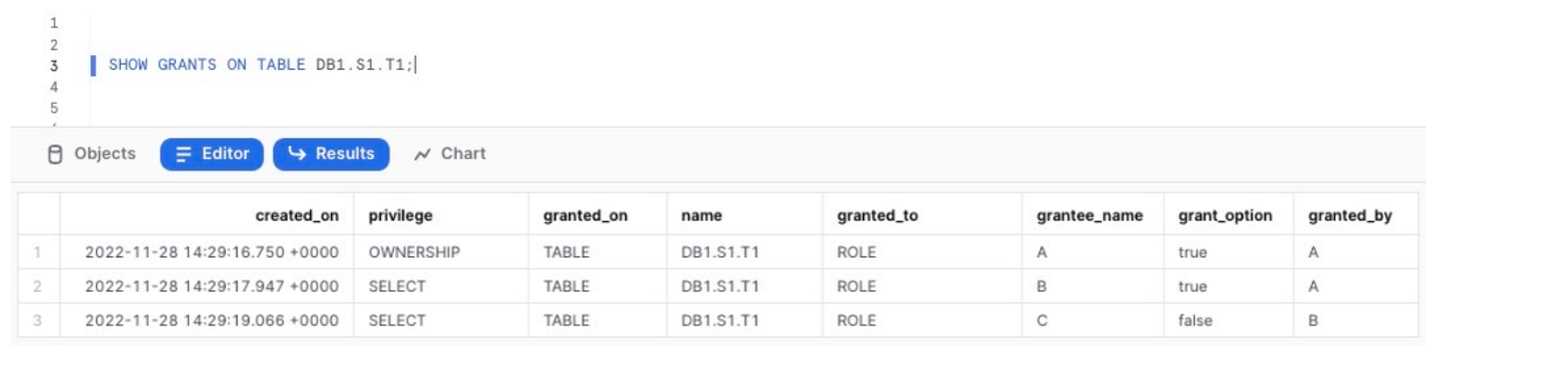
Q: 8Review the output of the SHOW statement below which displays the current grants on the table DB1. S1. T1:
This statement is executed:
USE ROLE ACCOUNTADMIN;
DROP ROLE A;
What will occur?OptionsDiscussionNo comments yet. Be the first to comment.Be respectful. No spam.Correct Answer:DExplanationThe DROP ROLE command will fail. According to Snowflake's access control model, a role that owns any securable objects cannot be dropped. The SHOW GRANTS output clearly indicates that ROLE A has the OWNERSHIP privilege on the table DB1.S1.T1. An attempt to drop this role will result in an error, and the operation will be aborted. Because the command fails, the state of the system remains unchanged, and all existing grants, including the SELECT privileges for roles B and C, will persist.
Why IncorrectA. The table object DB1. S1. T1 will be dropped.
Dropping a role does not cascade to drop the objects it owns; rather, ownership prevents the role from being dropped.
B. The OWNERSHIP privilege on table DB1. S1. T1 will be transferred to the ACCOUNTADMIN role.
Ownership is not transferred automatically. It must be explicitly transferred to another role using GRANT OWNERSHIP before the owning role can be dropped.
C. The SELECT privilege on table DB1. S1. T1 to role B will be shown as GRANTEDBY the role ACCOUNTADMIN.
The grantor of a privilege is not reassigned. If the grantor role were successfully dropped, the grants it made would be revoked, not transferred.
---
References1. Snowflake Documentation: DROP ROLE
Under "Usage Notes
" it explicitly states: "An error is returned if the role owns any objects. To drop the role
you must first transfer ownership of the objects to another role." This directly supports the conclusion that the command will fail.
Source: Snowflake Documentation
DROP ROLE
2. Snowflake Documentation: Overview of Access Control
The section on "Object Ownership" explains that every object is owned by a single role. This principle underpins the rule that an owning role cannot be dropped until ownership is transferred
preventing objects from becoming orphaned.
Source: Snowflake Documentation
Access Control Overview
3. Snowflake Documentation: GRANT OWNERSHIP
This command's documentation details the required procedure for transferring object ownership. It reinforces that dropping an owning role is a two-step process: first transfer ownership
then drop the role. The question's scenario omits the first required step.
Source: Snowflake Documentation
GRANT OWNERSHIP

Q: 9A Snowflake organization MYORG consists of two Snowflake accounts:
The ACCOUNT1 has a database PROD_DB and the ORGADMIN role enabled.
Management wants to have the PROD_DB database replicated to ACCOUNT2.
Are there any necessary configuration steps in ACCOUNT1 before the database replication can be
configured and initiated in ACCOUNT2?OptionsDiscussionNo comments yet. Be the first to comment.Be respectful. No spam.Correct Answer:AExplanationBefore a database can be replicated to another account within the same organization, replication must be explicitly enabled for both the source and target accounts. This action requires the ORGADMIN role. Subsequently, the ACCOUNTADMIN (or a role with sufficient privileges) in the source account must alter the specific database to authorize replication to the target account. Option A correctly outlines this entire prerequisite sequence: using ORGADMIN to enable replication for both ACCOUNT1 and ACCOUNT2, and then using ACCOUNTADMIN in ACCOUNT1 to authorize PRODDB for replication to ACCOUNT2.
Why IncorrectB: This option is incomplete. It correctly enables replication for the source account (ACCOUNT1) but fails to enable it for the target account (ACCOUNT2), which is a mandatory prerequisite.
C: This statement is incorrect. Database replication between accounts, even within the same organization, is not enabled by default and requires explicit configuration by an ORGADMIN.
D: This statement is incorrect. Snowflake explicitly supports replicating databases from an account on a higher edition (e.g., Enterprise) to an account on a lower edition (e.g., Standard).
References1. Snowflake Documentation: Introduction to replication and failover across multiple accounts.
Section: Prerequisites for Replication -> Step 1: Enable Replication for Accounts in the Organization. This section states
"A user with the ORGADMIN role must enable replication for each source and target account in the organization." It provides the exact syntax: SELECT SYSTEM$GLOBALACCOUNTSETPARAMETER('.'
'ENABLEACCOUNTDATABASEREPLICATION'
'true');. This supports the first two commands in option A.
2. Snowflake Documentation: Replicating a primary database.
Section: Step 2: Promote a Local Database to a Primary Database. This section details the next step: "A user with the ACCOUNTADMIN role... in the source account executes an ALTER DATABASE … ENABLE REPLICATION TO ACCOUNTS statement to authorize replication of the primary database to one or more accounts...". This supports the final command in option A.
3. Snowflake Documentation: Replication and Failover.
Section: Replication from a source account on a higher edition. This section confirms that "Replication and failover from a source account on a higher edition to a target account on a lower edition is supported." This directly refutes option D.