1. Adobe Workfront Documentation, "Calculate User Availability": The official documentation explicitly states the formula for user availability: User Availability = (Default Schedule Hours FTE) - Exceptions - Time Off. This formula directly confirms that both FTE and Time Off are primary inputs for calculating available hours. (Reference: Adobe Experience League, Workfront Documentation, Article ID: 000013388, "Calculate User Availability" section).
2. Adobe Workfront Documentation, "Edit a user's profile": In the section describing user profile fields, the "FTE" (Full Time Equivalent) field is defined. It specifies that this value adjusts the user's availability based on the percentage of a standard schedule they work. For example, an FTE of 0.5 for a 40-hour default schedule results in 20 available hours. (Reference: Adobe Experience League, Workfront Documentation, Article ID: 000013373, "Edit a user's profile," section on "Personal Info").
3. Adobe Workfront Documentation, "Enter time off for a user": This document explains that when time off is entered for a user, "Workfront considers them unavailable for work during that time." It further clarifies that this unavailability is reflected in resource management tools, including the Resource Planner, by reducing their available hours. (Reference: Adobe Experience League, Workfront Documentation, Article ID: 000013377, "Enter time off for a user" section).

 Which two settings can affect a user's total number of hours shown in the available hours (AVL)
column? (Choose two.)
Which two settings can affect a user's total number of hours shown in the available hours (AVL)
column? (Choose two.)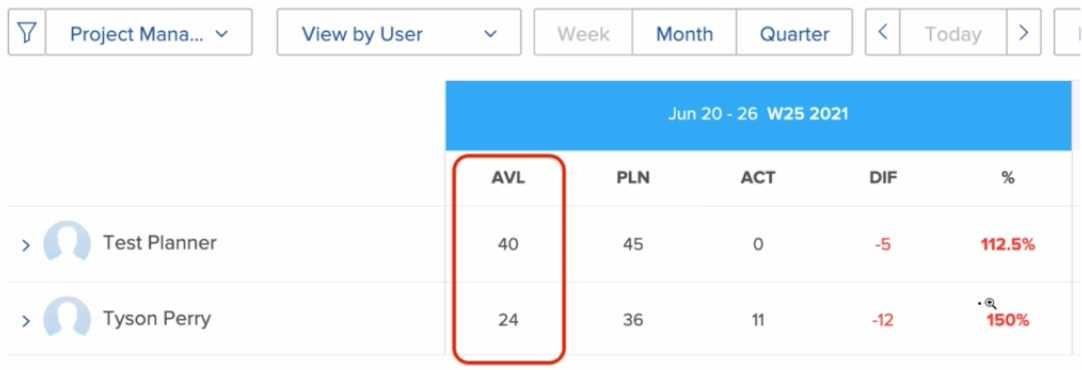 Which two settings can affect a user's total number of hours shown in the available hours (AVL)
column? (Choose two.)
Which two settings can affect a user's total number of hours shown in the available hours (AVL)
column? (Choose two.)