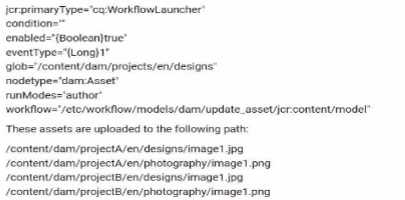
In this scenario, the workflow launcher is configured to trigger a workflow for assets in the path
/content/dam/projects/en/designs. However, to ensure that the workflow only triggers for image
assets, the condition must be updated to filter the relevant asset types. The condition should be
modified to dc:format==image/*, which ensures that only assets with an image format trigger the
workflow.
Condition "dc
==image/*": This filters assets based on their format (MIME type), ensuring that the workflow is only
triggered for images, which matches the use case of working with assets such as JPGs or PNGs.
Option B suggests modifying the path, but the existing path (/content/dam/projects/en/designs) is
correct for the project structure. Option C suggests changing the node type to nt:file, which is
incorrect since the node type for assets in AEM is typically dam:Asset.
For more information, refer to AEM documentation on workflow launchers and DAM metadata
properties.

 What change should be made to the configuration to trigger the workflow?
 What change should be made to the configuration to trigger the workflow?