According to the Adobe Campaign Classic Business Practitioner Exam Guide1, one of the tasks that
you should be able to perform as an Adobe Campaign Business Practitioner is to control costs.
Adobe Campaign lets you control scheduled, committed and invoiced marketing costs and to break
them down by category using the Marketing Resource Management module1. This module allows
you to define budgets for your campaigns and programs, as well as providers and stocks.
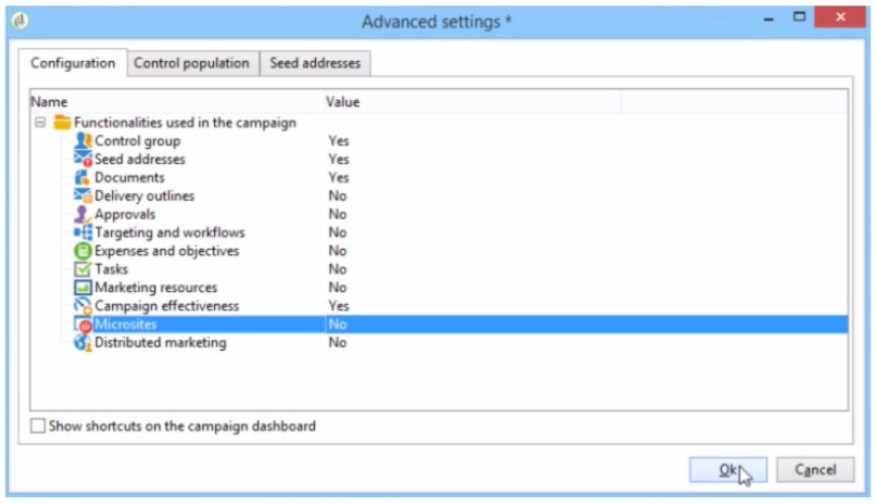
To enable budget detail properties for a campaign template, you need to activate the Expenses and
Objectives option in Advanced campaign settings1. This option will display a Budget tab in the
campaign template where you can configure budget details such as cost entries, providers, stocks,
etc.
https://experienceleague.adobe.com/docs/campaign-classic/using/mrm/controllingcosts.html?lang=en
In the context of Adobe Campaign Classic, budget details for a campaign are typically managed
through the 'Expenses and Objectives' functionality. This feature allows business practitioners to set
and track the budget and cost-related details for their marketing campaigns. When this option is
activated in the campaign template's advanced settings, it enables the functionality to enter and
manage financial details such as budgeted amounts, actual costs, and associated financial objectives.
Therefore, to enable budget detail properties in a budget campaign template, the business
practitioner should select the 'Expenses and Objectives' option and set its value to 'Yes' in the
'Advanced settings' tab under the 'Configuration' section as shown in the interface provided.

 What should they configure to enable budget detail properties?
 What should they configure to enable budget detail properties?