
Q: 15
DRAG DROP Drag and drop the code from the bottom onto the box where the code is missing to retrieve and display wireless network hearth information. The wireless network devices are being managed by Cisco DNA Center and are compatible with REST API Not all options are used. 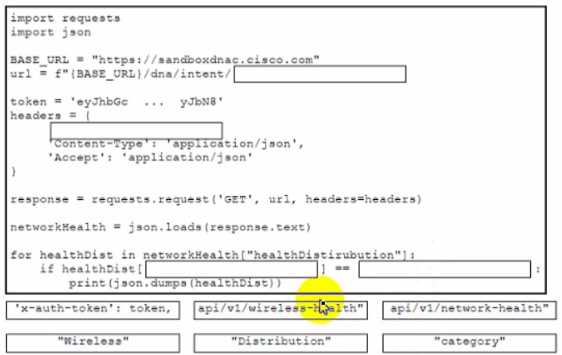
Drag & Drop
Discussion
api/v1/wireless-health for Bucket 1, "x-auth-token': token, next, then check "category" and match it to "Wireless" in the last buckets. This matches official docs and practice labs. I think that's the correct flow but open to better logic.
Bucket 1: api/v1/wireless-health, Bucket 2: 'x-auth-token': token, Bucket 3: "category", Bucket 4: "Wireless"
api/v1/wireless-health → Bucket 1, "x-auth-token': token, → Bucket 2, "category" → Bucket 3, "Wireless" → Bucket 4. Saw something super similar in other exam reports.
Looks right to me, Bucket 1 is api/v1/wireless-health since that's the correct endpoint, then token header, then checking 'category' for "Wireless" in the loop. Pretty sure that's how Cisco DNA Center REST calls work. Agree?
Hmm, I thought Bucket 1 should be api/v1/network-health, not wireless-health, and Bucket 4 would use "Distribution". Anyone see it another way?
Be respectful. No spam.