
Q: 2
DRAG DROP
 Refer to the exhibit. Drag and drop the subnets and flags from the left into the External Network
Instance Profile policies on the right to create a setup that advertises only 10.10.0.0/24 and
10.10.1.0/24 prefixes in VRF1 and establishes connectivity between VRFs. Not all options are used.
Refer to the exhibit. Drag and drop the subnets and flags from the left into the External Network
Instance Profile policies on the right to create a setup that advertises only 10.10.0.0/24 and
10.10.1.0/24 prefixes in VRF1 and establishes connectivity between VRFs. Not all options are used.
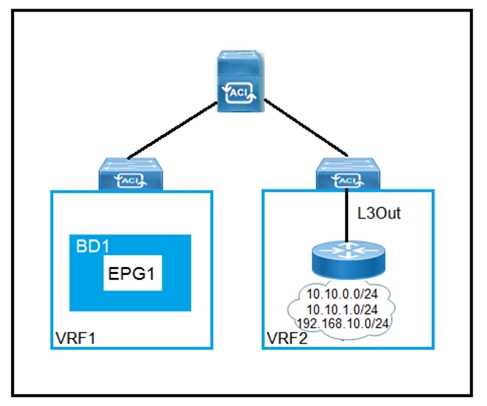 Refer to the exhibit. Drag and drop the subnets and flags from the left into the External Network
Instance Profile policies on the right to create a setup that advertises only 10.10.0.0/24 and
10.10.1.0/24 prefixes in VRF1 and establishes connectivity between VRFs. Not all options are used.
Refer to the exhibit. Drag and drop the subnets and flags from the left into the External Network
Instance Profile policies on the right to create a setup that advertises only 10.10.0.0/24 and
10.10.1.0/24 prefixes in VRF1 and establishes connectivity between VRFs. Not all options are used.
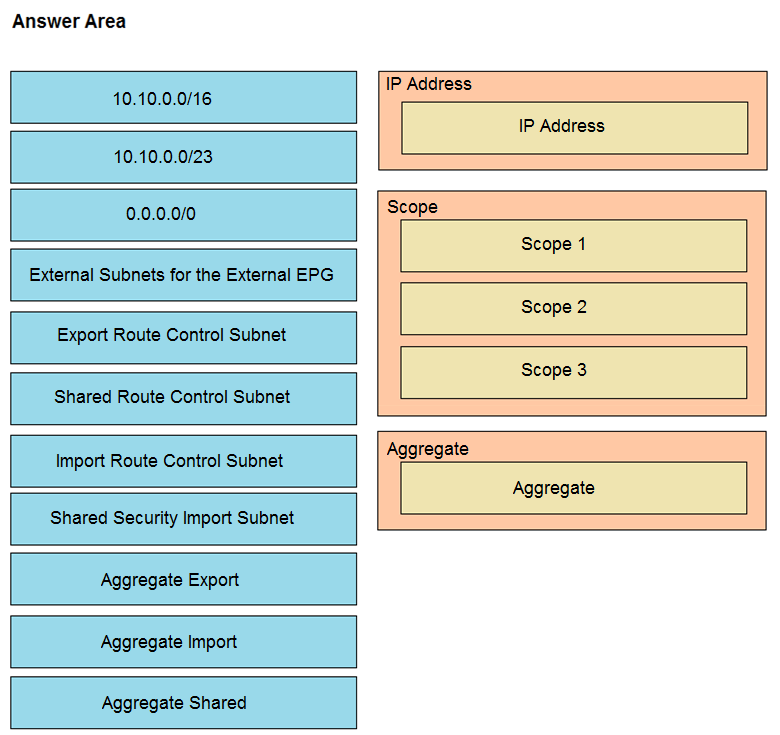
Your Answer
Discussion
No comments yet. Be the first to comment.
Be respectful. No spam.
