
Q: 1
An administrator wants to use tag-based placement rules on their virtual machine disks using
VMware vCenter.
Which option would allow the administrator to achieve this?
Options
Discussion
Nah, C is tempting if you're thinking about VASA and external arrays, but for tag-based disk placement it's A every time.
A
A imo, saw a similar question in an exam report and it was Storage Policy Based Management for tag-based VM disk placement.
Probably A, but C makes me pause if it’s external storage. Not 100 percent sure here.
A that's what you need for tag rules in vCenter.
A , tag-based placement is all about Storage Policy Based Management.
Seen similar on a practice test, it's A. Official guide talks about Storage Policy Based Management using tags.
Be respectful. No spam.
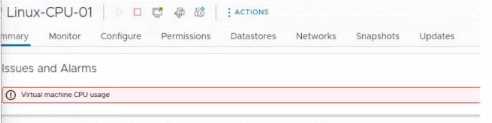 After removing an ESXi host from a cluster for maintenance, a number of virtual machines have
encountered the warning seen in the exhibit. After re-adding the ESXi, the issue is resolved. Which
step should the administrator take to move the triggered alarm to its normal state?
After removing an ESXi host from a cluster for maintenance, a number of virtual machines have
encountered the warning seen in the exhibit. After re-adding the ESXi, the issue is resolved. Which
step should the administrator take to move the triggered alarm to its normal state?