
Q: 9
Refer to the exhibit.
 After removing an ESXi host from a cluster for maintenance, a number of virtual machines have
encountered the warning seen in the exhibit. After re-adding the ESXi, the issue is resolved. Which
step should the administrator take to move the triggered alarm to its normal state?
After removing an ESXi host from a cluster for maintenance, a number of virtual machines have
encountered the warning seen in the exhibit. After re-adding the ESXi, the issue is resolved. Which
step should the administrator take to move the triggered alarm to its normal state?
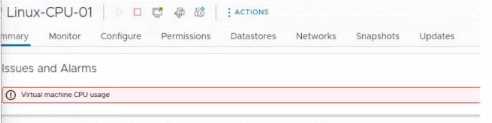 After removing an ESXi host from a cluster for maintenance, a number of virtual machines have
encountered the warning seen in the exhibit. After re-adding the ESXi, the issue is resolved. Which
step should the administrator take to move the triggered alarm to its normal state?
After removing an ESXi host from a cluster for maintenance, a number of virtual machines have
encountered the warning seen in the exhibit. After re-adding the ESXi, the issue is resolved. Which
step should the administrator take to move the triggered alarm to its normal state?Options
Discussion
I've always just acknowledged these alarms and they go away, so C.
I don’t think C is right, it’s got to be B. Acknowledge only stops the pop-up, doesn’t change the alarm itself in vSphere.
Why do some folks think acknowledging the alarm (C) actually resets it? Doesn't that just silence notifications instead of fixing the root alert state in vSphere? Curious if anyone's seen different in 8.x clusters.
Yeah, Reset to Green is the move here (B). Acknowledge only quiets the notification but doesn't actually put the alarm back to normal state in vCenter. Pretty sure that's the expected VMware workflow, but let me know if I'm wrong.
A is wrong, B. You actually need to "Reset to Green" so the alarm state clears out after the issue is fixed. Just acknowledging it doesn't do that, it just hides the notification. Seen this on my test cluster, pretty sure that's how VMware works.
Probably B here. When the HA issue is fixed, vCenter doesn't always clear the alarm on its own. "Reset to Green" actually resets the status, where Acknowledge just silences it. I'm pretty sure that's the official workflow for these alarms.
C or B for me. I've always just hit Acknowledge (C) on these and the alarm seemed to clear up, especially in smaller labs, but maybe that's not how it works at scale. Is Acknowledge just for silencing the alert instead of actually resetting its state? Maybe I'm mixing up vCenter behavior here-let me know if I'm off.
A isn’t right, it’s B. Pretty sure you have to use “Reset to Green” for vSphere HA alarms after fixing the resource issue, otherwise the alert stays active even though things are fine now. Someone confirm?
Be respectful. No spam.
