
DRAG DROP Drag and Drop the Bash commands from the left onto the correct actions on the right. 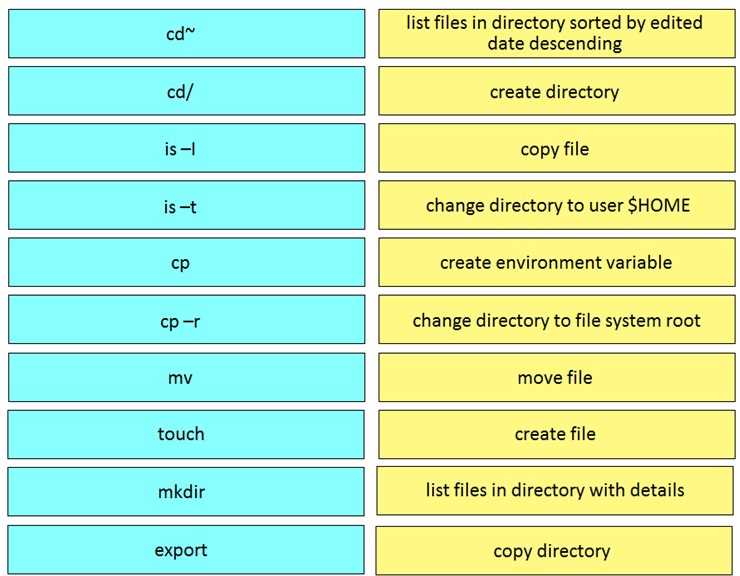
Saw a similar mapping on practice. Pretty sure this is correct: ls-t sorts by edited date, mkdir for making a dir, cp handles files, cp -r is used for directories, cd~ jumps to $HOME, cd/ to root, export sets env variables, mv moves files, touch creates files, and ls-l shows details. Let me know if someone disagrees but this looks solid.
Nice, this mapping tracks with bash basics. cp for files, cp -r for directories, ls -t sorts by modified date (descending by default), and ls -l gives detail view. cd~ is a shortcut to $HOME and cd/ is root. Mkdir, touch, and export are standard as well. Pretty sure these match up unless the test tries to trick with switches-agree?
- list files in directory sorted by edited date descending: is-t
- create directory: mkdir
- copy file: cp
- change directory to user $HOME: cd~
- create environment variable: export
- change directory to file system root: cd/
- move file: mv
- create file: touch
- list files in directory with details: is-l
- copy directory: cp -r
- ls-t → list files sorted by edited date
- mkdir → create directory
- cp → copy file
- cd~ → home dir
- export → set env var
- cd/ → root
- mv → move file
- touch → create file
- ls-l → details view
- cp -r → copy directory
Looks right based on the CLI basics. In practice labs and official docs, ls -l is for details and ls -t sorts by mod date. So mapping would be: cd~ to home, cd/ to root, mkdir for make directory, cp -r for directory copy.
