The answer is B
because
the
code
fragment contains
a logical
error that causes a
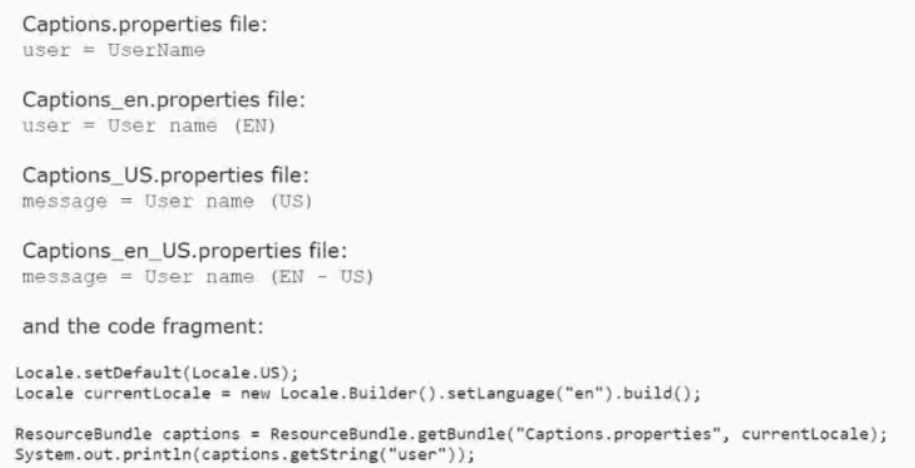
MissingResourceException at runtime. The code fragment tries to load a resource bundle with the
base name “Captions.properties” and the locale “en_US”. However, there is no such resource bundle
available in the classpath. The available resource bundles are:
Captions.properties
Captions_en.properties
Captions_US.properties
Captions_en_US.properties
The ResourceBundle class follows a fallback mechanism to find the best matching resource bundle
for a given locale. It first tries to find the resource bundle with the exact locale, then it tries to find
the resource bundle with the same language and script, then it tries to find the resource bundle with
the same language, and finally it tries to find the default resource bundle with no locale. If none of
these resource bundles are found, it throws a MissingResourceException.
In this case, the code fragment is looking for a resource bundle with the base name
“Captions.properties” and the locale “en_US”. The ResourceBundle class will try to find the following
resource bundles in order:
Captions.properties_en_US
Captions.properties_en
Captions.properties
However, none of these resource bundles exist in the classpath. Therefore, the ResourceBundle class
will throw a MissingResourceException.
To fix this error, the code fragment should use the correct base name of the resource bundle family,
which is “Captions” without the “.properties” extension. For example:
ResourceBundle captions = ResourceBundle.getBundle(“Captions”, currentLocale);
This
will
load
the
appropriate
resource
bundle
for
the
current
locale,
which
is
“Captions_en_US.properties” in this case. Reference:
Oracle Certified Professional: Java SE 17 Developer
Java SE 17 Developer
OCP Oracle Certified Professional Java SE 17 Developer Study Guide
ResourceBundle (Java Platform SE 8 )
About the ResourceBundle Class (The Java™ Tutorials > Internationalization)

 What is the result?
 What is the result?