You might need to replace a disk in the root pool for the following reasons:
The root pool is too small and you want to replace it with a larger disk
The root pool disk is failing. In a non-redundant pool, if the disk is failing so that the system won't
boot, you'll need to boot from an alternate media, such as a CD or the network, before you replace
the root pool disk.
In a mirrored root pool configuration, you might be able to attempt a disk replacement without
having to boot from alternate media. You can replace a failed disk by using the zpool replace
command.
Some hardware requires that you offline and unconfigure a disk before attempting the zpool replace
operation to replace a failed disk.
For example:
# zpool offline rpool c1t0d0s0
# cfgadm -c unconfigure c1::dsk/c1t0d0
# cfgadm -c configure c1::dsk/c1t0d0
# zpool replace rpool c1t0d0s0
# zpool online rpool c1t0d0s0
# zpool status rpool
SPARC# installboot -F zfs /usr/platform/`uname -i`/lib/fs/zfs/bootblk /dev/rdsk/c1t0d0s0
x86# installgrub /boot/grub/stage1 /boot/grub/stage2 /dev/rdsk/c1t9d0s0

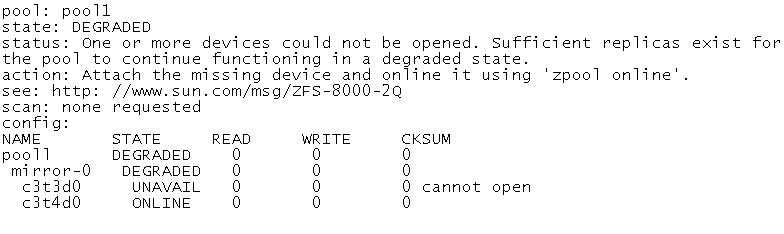
 Choose the correct procedure to repair this storage pool.
 Choose the correct procedure to repair this storage pool.