for the
complete solution.
Explanation:
Back-to-Back Fulfillment in Oracle Inventory Cloud
Back-to-back fulfillment in Oracle Inventory Cloud is a supply chain process where supply is created
only after a sales order is placed. This process links the demand (customer sales order) directly to the
supply (procurement, manufacturing, transfer, or existing stock), ensuring efficient inventory
management while meeting customer demands. Below is a detailed step-by-step explanation of the
back-to-back fulfillment process.
1. Overview of Back-to-Back Fulfillment Process
The back-to-back (B2B) fulfillment process ensures that supply is created only when a customer order
is received.
Supply is specifically reserved for the sales order until shipping.
This process helps reduce excess inventory while maintaining responsiveness to customer needs.
It supports four fulfillment strategies: Buy, Make, Transfer, and On Hand Reservation.
Back-to-back fulfillment is mainly used in discrete manufacturing environments.
2. Step-by-Step Back-to-Back Fulfillment Process in Oracle Inventory Cloud
The back-to-back fulfillment process consists of the following key steps:
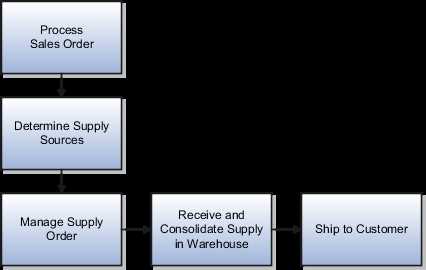
Step 1: Process Sales Order
The sales order is created in Oracle Order Management.
The order is validated for correctness (items, quantities, prices, etc.).
The order is scheduled, and the system checks if on-hand inventory is available.
If no inventory is available, Oracle Supply Chain Orchestration initiates a back-to-back fulfillment
request.
Step 2: Determine Supply Sources
Oracle Supply Chain Orchestration (SCO) determines the best supply source based on predefined
rules and sourcing strategies.
The system evaluates the following supply options:
Buy: Procurement from an external supplier.
Make: Internal manufacturing or contract manufacturing.
Transfer: Movement of inventory from another warehouse or distribution center.
On Hand: Direct reservation of existing inventory.
Step 3: Create and Manage the Supply Order
A supply order is generated in Oracle Supply Chain Orchestration.
The order is assigned to the appropriate fulfillment method:
Buy Order: A purchase requisition is created in Oracle Procurement Cloud, and the supplier provides
the required goods.
Make Order: A work order is created in Oracle Manufacturing Cloud, and production begins.
Transfer Order: A transfer request is initiated in Oracle Inventory Management, moving stock from
another warehouse.
On-Hand Reservation: If stock is available, it is reserved against the sales order.
Oracle monitors the progress of the supply order until completion.
Step 4: Receive and Consolidate Supply in Warehouse
Once supply is procured, manufactured, or transferred, it is received in the fulfillment warehouse.
If it is a purchased item, a receipt is created in Oracle Receiving.
If it is a manufactured item, the work order is completed, and inventory is updated.
The system ensures that the received inventory is linked to the original sales order.
Step 5: Ship to Customer
The sales order is released for fulfillment.
A Pick Release process is initiated in Oracle Inventory Cloud to allocate stock.
The order is picked, packed, and shipped using Oracle Shipping Execution.
A shipping confirmation is generated, and an invoice is created in Oracle Receivables.
The sales order is marked as complete, and the supply order is closed.
3. Detailed Explanation of Back-to-Back Fulfillment Flows
1. Buy Flow (Procurement)
If the supply is sourced externally, the system generates a purchase order in Oracle Procurement
Cloud.
The supplier delivers the goods, which are received in Oracle Receiving.
The inventory is updated, and the order is prepared for shipment.
The sales order is fulfilled once the goods arrive.
2. Make Flow (Manufacturing)
If the item is manufactured internally, a work order is created in Oracle Manufacturing Cloud.
Production is executed, and the finished product is stored in inventory.
The system reserves the item against the sales order.
The order is fulfilled when the product is available.
3. Transfer Flow (Warehouse Transfer)
If the item is available in another warehouse, a transfer order is generated in Oracle Inventory Cloud.
The inventory is moved to the fulfillment warehouse.
Once received, the inventory is reserved and prepared for shipment.
The sales order is completed upon shipment.
4. On Hand Flow (Inventory Reservation)
If the item is available in stock, the system directly reserves it.
The order moves to the shipping phase without additional procurement or manufacturing steps.
The pick, pack, and ship process is executed, and the order is fulfilled.
4. Key Benefits of Back-to-Back Fulfillment in Oracle Inventory Cloud
✔ Reduced Inventory Holding Costs – Stock is only procured, manufactured, or transferred when
needed.
✔ Improved Order Fulfillment Efficiency – Orders are linked directly to supply, reducing delays.
✔ Better Customer Satisfaction – Customers receive products faster with reduced stockouts.
✔ Automated Supply Chain Coordination – Oracle Cloud applications ensure seamless integration
between order management, procurement, manufacturing, and inventory.
✔ Flexibility in Sourcing – Users can choose between procurement, manufacturing, transfer, or
existing stock to fulfill demand efficiently.
5. Oracle Cloud Modules Involved in Back-to-Back Fulfillment
https://kxbjsyuhceggsyvxdkof.supabase.co/storage/v1/object/public/file-images/1Z0-1073-25/page_48_img_1.jpg
6. Example Use Case: Back-to-Back Fulfillment in Action
Scenario:
A customer places an order for 100 units of Item XYZ, but there is no stock available in the
warehouse.
Solution:
The system checks stock availability and identifies that back-to-back fulfillment is required.
The sourcing rules determine that procurement from an external supplier is the best option.
A purchase requisition is created in Oracle Procurement Cloud.
The supplier delivers the items, and they are received into inventory.
The inventory is reserved against the sales order.
The shipping process is initiated, and the order is delivered to the customer.
The sales order and supply order are closed.

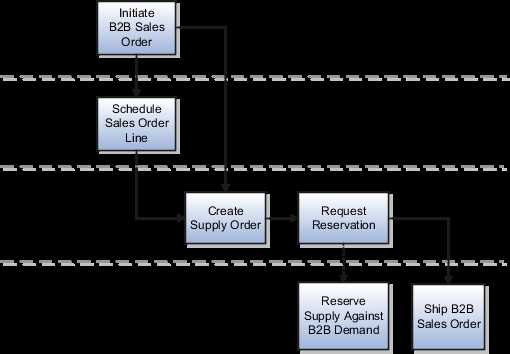
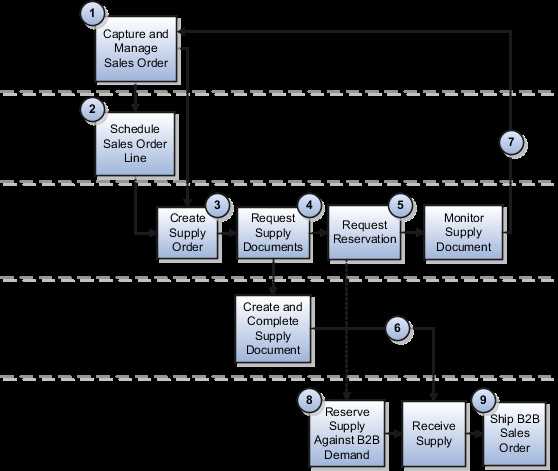
 Back-to-back fulfillment is where supply is procured and then received at a warehouse only after an
order is placed.
The supply is reserved against a sales order until shipping.
This process provides support to create and link supply after a sales order is entered and scheduled,
allowing you to reduce your inventory while maintaining the ability to respond to customer
demands.
You create supply for a back-to-back order using one or more of the following back-to-back flows:
•
Buy: Procurement from an external supplier.
•
Make: Production in an internal manufacturing facility (includes in-house manufacturing and
contract manufacturing).
•
Transfer: Transfer from another warehouse.
•
On hand: Reservation of on-hand supply in the fulfillment organization.
Note: For information about back-to-back flows for contract manufacturing, see the Implementing
Contract Manufacturing chapter in this guide.
After the supply is received into the fulfillment warehouse, the back-to-back order is ready for
shipment to the customer.
Back-to-back fulfillment is where supply is procured and then received at a warehouse only after an
order is placed.
The supply is reserved against a sales order until shipping.
This process provides support to create and link supply after a sales order is entered and scheduled,
allowing you to reduce your inventory while maintaining the ability to respond to customer
demands.
You create supply for a back-to-back order using one or more of the following back-to-back flows:
•
Buy: Procurement from an external supplier.
•
Make: Production in an internal manufacturing facility (includes in-house manufacturing and
contract manufacturing).
•
Transfer: Transfer from another warehouse.
•
On hand: Reservation of on-hand supply in the fulfillment organization.
Note: For information about back-to-back flows for contract manufacturing, see the Implementing
Contract Manufacturing chapter in this guide.
After the supply is received into the fulfillment warehouse, the back-to-back order is ready for
shipment to the customer.