Free SC-401 Practice Test Questions and Answers (2026)

Last Update Check
View Mode
Q: 1
You have a Microsoft J65 E5 subscription that contains a user named User1. All users are assigned Microsoft 365 Copilot licenses. You deploy Microsoft Purview Data Security Posture Management for Al (DSPM for Al). You need to ensure that User1 can analyze prompts and responses for Al interaction events. The solution must follow the principle of least privilege. To which two role groups should you add User1? Each correct answer presents part of the solution. NOTE; Each correct selection is worth one point.
Options
31 comments in the community discussion
2
Probably C and E here since those two roles let User1 view and drill into the actual content in Content Explorer without giving more than necessary. Least privilege is key for Purview, so not seeing a need for A or D. Anyone see an angle I missed?
1
C/E. Both are needed for full access to prompt contents in Content Explorer. Not 100 percent but that's consistent with least privilege.
Q: 2
You have a Microsoft 365 E5 subscription. You plan to use insider risk management to collect and investigate forensic evidence. You need to enable forensic evidence capturing. What should you do first?
Options
26 comments in the community discussion
2
Its B, you have to claim capacity before anything else happens in Purview for this feature. Nothing else is possible until that's done. Pretty sure that's required per docs, agree?
2
Option B
Q: 3

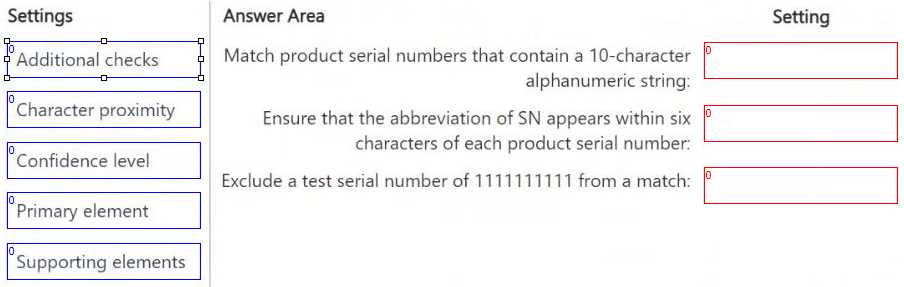
DRAG DROP You have a Microsoft 365 E5 subscription that has data loss prevention (DLP) implemented. You need to create a custom sensitive info type. The solution must meet the following requirements: ● Match product serial numbers that contain a 10-character alphanumeric string. ● Ensure that the abbreviation of SN appears within six characters of each product serial number. ● Exclude a test serial number of 1111111111 from a match. Which pattern settings should you configure for each requirement? To answer, drag the appropriate settings to the correct requirements. Each setting may be used once, more than once, or not at all. You may need to drag the split bar between panes or scroll to view content. NOTE: Each correct selection is worth one point. Microsoft SC-401 Dumps question

Drag & Drop
31 comments in the community discussion
6
Primary element for matching the 10-char alphanumeric, character proximity to handle SN within six characters, and additional checks to exclude 1111111111. Supporting elements might look tempting for exclusion, but additional checks is the only one that does this in DLP custom SITs. Unless MS changes syntax, this is sa
6
Yeah, I've seen this pattern too: Primary element maps to the alphanumeric match, character proximity is how you set 'SN' near the serial, and additional checks is where you exclude 1111111111. Pretty sure that's right but happy for other views.
Q: 4
You have a Microsoft 365 subscription. You have a user named User1 Several users have full access to the mailbox of User1. Some email messages sent to User 1 appeal to have been read and deleted before the user viewed them When you search the audit log in the Microsoft Purview portal to identify who signed in to the mailbox of User l. the results are blank. You need to ensure that you can view future sign-ins to the mailbox of User1. Solution: You run the Set-AuditConfig -Workload Exchange command. Does that meet the goal?
Options
33 comments in the community discussion
3
B . Had something like this in a mock, Set-AuditConfig doesn’t handle auditing for just one mailbox, it’s for org-level only. You need Set-Mailbox -AuditEnabled $true for User1. Correct me if I’m missing new updates.
2
B is the right call here. Set-AuditConfig just sets audit logging at the org level, not per mailbox-easy to mix up if you don't work with these cmdlets much. You'd need Set-Mailbox -AuditEnabled $true for User1 specifically. Seen a few trip over this in practice.
Q: 5
You implement Microsoft 36S Endpoint data loss pi event ion (Endpoint DIP). You have computer that run Windows 11 and have Microsoft 365 Apps instated The computers are joined to a Microsoft Entra tenant You need to ensure that endpoint DIP policies can protect content on the computers. Solution: You deploy the Microsoft Purview Information Protection client to the computers. Does this meet the goal?
Options
35 comments in the community discussion
2
B tbh. Good question, it tests if you know the difference between Endpoint DLP and MIP client. The MIP client is for labeling and doesn't enable Endpoint DLP protection on its own. Endpoint DLP works if devices are onboarded in the Purview compliance portal, not just by installing the MIP client. Pretty sure B is right
1
I’d actually pick A. Deploying the Purview client feels like it should enable DLP since it manages information protection, right? Pretty sure there’s overlap with labeling and policy enforcement. Not 100 percent though, maybe I’m missing the device onboarding requirement.
Q: 6

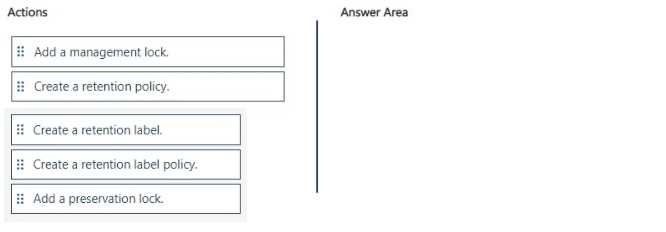
DRAG DROP You have a Microsoft 365 tenant. A new regulatory requirement states that all documents containing a patent ID be labeled, retained for 10 years, and then deleted. The policy used to apply the retention settings must never be disabled or deleted by anyone. You need to implement the regulatory requirement. Which three actions should you perform in sequence? To answer, move the appropriate actions from the list of actions to the answer area and arrange them in the correct order. Microsoft SC-401 Dumps question

Drag & Drop
30 comments in the community discussion
5
Create retention label > create retention label policy > add preservation lock. Management lock is just for Azure, easy trap.
5
Nah, it's create retention label, then retention label policy, then add a preservation lock. Management lock is more for Azure resources, preservation lock is what actually blocks admin changes to retention policies. Seen similar on practice, pretty sure this is the sequence. There's a trap on management lock here.
Q: 7
You have a Microsoft 36S ES subscription that contains a Windows 11 device named Device 1 and three users named User 1. User2. and User3. You plan to deploy Azure Information Protection (AIP) and the Microsoft Purview Information Protection client to Device 1. You need to ensure that the users can perform the following actions on Device1 as part of the planned deployment • User 1 will test the functionality of the client. • User2 will install and configure the Microsoft Rights Management connector. • User3 will be configured as the service account for the information protection scanner. The solution must maximize the security of the sign-in process for the users What should you do?
Options
41 comments in the community discussion
6
Option B makes more sense here since passwordless authentication is supported for both interactive and service accounts (like User3), but passkey (D) won't work for non-interactive scenarios. D looks tempting but is a trap for service use. Anyone disagree?
2
B tbh
Q: 8
You have a Microsoft 365 ES subscription. You have a Microsoft SharePoint Online document library that contains Microsoft Word and Excel documents. The documents contain the following types of information: • Credit card numbers • Physical addresses in the UK • National hearth service numbers from the UK • Sensitive projects that contain the following words: Project Tailspin. Project Contoso, and Project falcon You have email messages m Microsoft Exchange Online that contain the following information types: • Credit card numbers • User sign-in credentials • National health service numbers from the UK You plan to use sensitive information types (SITs) for compliance policies. What is the minimum number of SITs required to classify all the information types?
Options
24 comments in the community discussion
6
Option B seen similar on exam reports. You need 5 SITs here.
2
Man, these exam questions are wordy for no reason. B tbh.
Q: 9

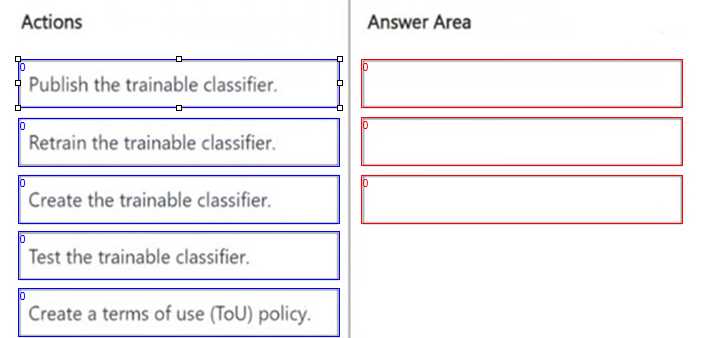
DRAG DROP You need to create a trainable classifier that can be used as a condition in an auto-apply retention label policy. Which three actions should you perform in sequence? To answer, move the appropriate actions from the list of actions to the answer area and arrange them in the correct order. Microsoft SC-401 Dumps question

Drag & Drop
35 comments in the community discussion
6
Create the trainable classifier → Test the trainable classifier → Publish the trainable classifier. Retrain's just a decoy here.
6
Create the trainable classifier → Test the trainable classifier → Publish the trainable classifierThis is the right order because you always have to create it first, test and tweak it so it works well, then publish for use in policies. "Retrain" isn’t a required step unless accuracy isn’t good and ToU doesn’t f
Q: 10

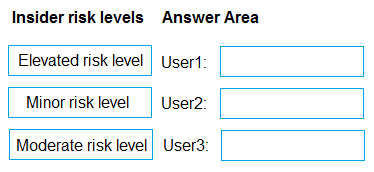
DRAG DROP You have a Microsoft 365 E5 subscription that uses Microsoft Purview insider risk management and contains three users named User1, User2, and User3. All insider risk management policies have adaptive protection enabled and the default conditions for insider risk levels configured. The users perform the following activities, which trigger insider risk policy alerts: User1 performs at least one data exfiltration activity that results in a high severity risk score. User2 performs at least three risky user activities within seven days, that each results in a high severity risk score. User3 performs at least bwo data exfiltration activities within seven days, that each results in a high severity risk score. Which insider risk level is assigned to each user? To answer, drag the appropriate levels to the correct users. Each level may be used once, more than once, or not at all. You may need to drag the split bar between panes or seroll to view content. NOTE: Each correct selection is worth one point.

Drag & Drop
38 comments in the community discussion
6
User1 minor, User2 elevated, User3 moderate risk level. Seen similar mapping in exam reviews.
5
Minor risk level (User1), Elevated risk level (User2), Moderate risk level (User3). In the default adaptive protection config, User2's frequency of high-severity activity bumps them to elevated, while just one exfiltration keeps User1 at minor. Policy changes could flip the order but nothing custom in this scenario.
Q: 11
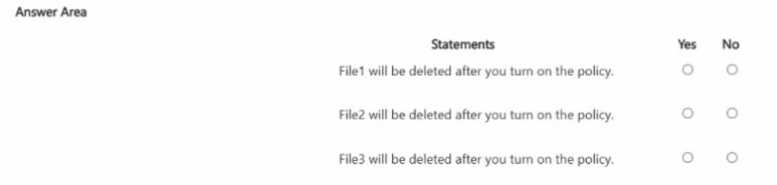
HOTSPOT You have the files shown in the following table. Microsoft SC-401 Dumps question You configure a retention policy as shown >n the exhibit. (Click the Exhibit lab.) The start of the retention period is based on when items are created. The current date is January 01. 207S. For each of the following statements, select Yes if the statement is true. Otherwise, select No. Microsoft SC-401 Dumps question
Your Answer
10 comments in the community discussion
7
Tricky one because the retention date is right at the cutoff. FILE1.DOCX hits its 7 years on Jan 15, so it'll get deleted automatically, but for FILE2 and FILE3 they're still inside the retention window as of Jan 1. No user delete for FILE3.
4
Nah, I don’t think user delete on FILE3.DOCX is right. Retention keeps it locked even if the user tries to delete, so NO for that. Trap is thinking users can remove files before retention end.
Q: 12

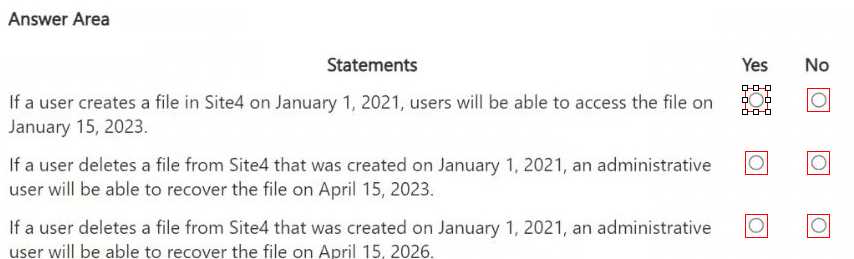
HOTSPOT You are reviewing policies for the SharePoint Online environment. For each of the following statements, select Yes if the statement is true. Otherwise, select No. NOTE: Each correct selection is worth one point. Microsoft SC-401 Dumps question
Your Answer
17 comments in the community discussion
6
YES YES NO. Sometimes people pick YES for #3 by mistake, but retention period ends Jan 2026 based on creation date. Seen similar wording trip folks up on practice. Policy doesn't protect after that, so last one is definitely NO.
5
Yep, still think it's YES YES NO. Retention policy is set to start from creation date, so the file's only protected up to Jan 2026. After that, like in statement 3, it's not retained anymore. Pretty sure this matches Microsoft behavior unless there's a different trigger date set. Agree?
Q: 13

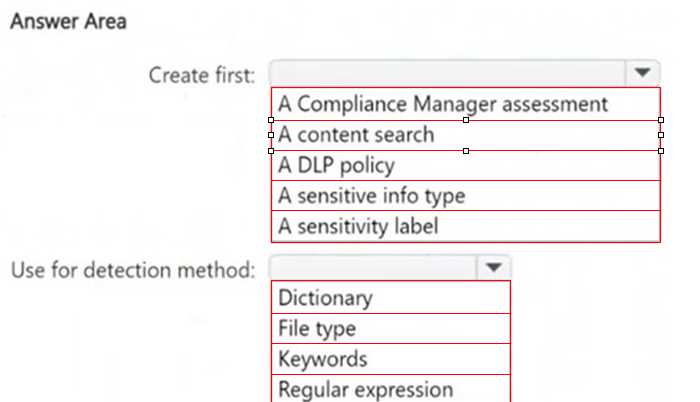
HOTSPOT You need to meet the technical requirements for the confidential documents. What should you create first, and what should you use for the detection method? To answer, select the appropriate options in the answer area. NOTE: Each correct selection is worth one point. Microsoft SC-401 Dumps question

Your Answer
11 comments in the community discussion
6
Don't think 'keyword' works here, needs to match a 7-digit pattern. Sensitive info type with regex.
4
Sensitive info type first, then use regular expression for detection. Pretty sure that's the only method precise enough for "Confidential" plus a seven-digit number, keywords wouldn't catch that pattern. Unless the format changes, regex is right here.
Q: 14
You have a Microsoft 365 E5 subscription that contains a Microsoft Teams channel named Channel1. Channel1 contains research and development documents. You plan to implement Microsoft 365 Copilot for the subscription. You need to prevent the contents of files stored in Channel1 from being included in answers generated by Copilot and shown to unauthorized users. What should you use?
Options
10 comments in the community discussion
1
C/D? Not sure which fits better, seems both could block data from Copilot.
Maybe C. Information Barriers restrict communication between groups, so I thought that could prevent Copilot from surfacing Channel1 data to unauthorized users. Practice exams sometimes mention this but I might be missing a finer detail.
Q: 15

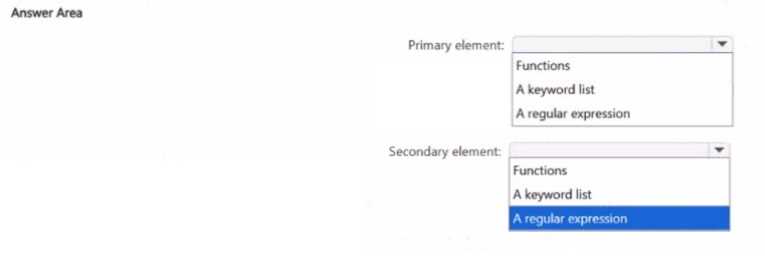
HOTSPOT You have a Microsoft 365 tenant You need to create a new sensitive into type for items that contain the following: • An employee ID number that consists of the hire date of the employee followed by a three digit number • The words "Employee", "ID", or "Identification" within 300 characters of the employee ID number What should you use for the primary and secondary elements? To answer, select the appropriate options m the answer area NOTE: Each correct selection is worth one point Microsoft SC-401 Dumps question

Your Answer
11 comments in the community discussion
9
Regular expression for primary, keyword list for secondary. This matches the pattern and nearby keywords just like MS Purview needs.
4
Regular expression primary, keyword list secondary. That's the combo for this kind of custom SIT in Purview, pretty sure.
Q: 16

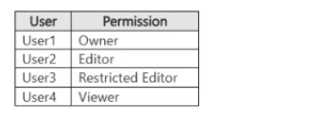
You have a Microsoft 365 E5 subscription that contains four users named User1. User2, User3, and User4 and a file named File1.docx. File1 has a sensitivity label applied. The label is configured as shown in the following table. Microsoft SC-401 Dumps question Which users can summarize File1 by using Microsoft 365 Copilot?
Options
11 comments in the community discussion
1
B , only User1 and User2 have the EXTRACT permission needed for Copilot to summarize the file. User3 looks tempting since they can edit, but without Copy/Extract right they're blocked. Option C is a trap if you don't notice that restriction. Speak up if anyone's seen different with custom configs.
1
B , only User1 and User2 have the required EXTRACT right for Copilot. Right?
Q: 17

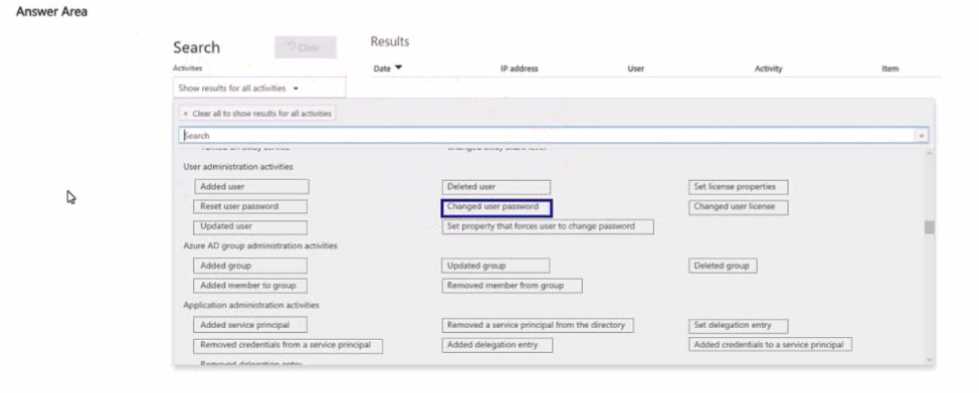
HOTSPOT You have a Microsoft 365 subscription. Auditing is enabled. A user named User1 is a member of a dynamic security group named Group1. You discover that User1 is no longer a member of Group1. You need to search the audit log to identify why User1 was removed from Group1. Which two activities should you use in the search? To answer, select the appropriate activities in the answer area. NOTE: Each correct selection is worth one point. Microsoft SC-401 Dumps question

Your Answer
13 comments in the community discussion
6
Updated group and Removed member from group are both needed for this. Changes to dynamic membership rules show as Updated group, while the actual removal is logged as Removed member from group. Saw a similar question in practice sets, so pretty confident, but open to correction.
4
I don't think Deleted user from group is right for dynamics, it's a trap since the group exists and only membership changed. Pretty sure Updated group and Removed member from group are what you need here. Anyone disagree?
Q: 18
Note: This question is part of a series of questions that present the same scenario. Each question in the series contains a unique solution that might meet the stated goals. Some question sets might have more than one correct solution, while others might not have a correct solution. After you answer a question in this section, you will NOT be able to return to it. As a result, these questions will not appear in the review screen. You recently discovered that the developers at your company emailed Azure Storage Account keys in plain text to third parties. You need to ensure that when Azure Storage Account keys are emailed, the emails are encrypted. Solution: You create a data loss prevention (DLP) policy that has only the Exchange email location selected. Does this meet the goal?
Options
10 comments in the community discussion
6
My pick: A. DLP scoped to Exchange can trigger encryption actions when specific data types (like storage keys) are detected. As long as the policy is set up right, this should meet the goal. Pretty sure this is how Purview DLP works, but correct me if I’m off.
1
C or D? DLP on Exchange does support encryption actions if the right conditions are set, but sometimes orgs just alert instead of encrypting. I'm thinking A is correct here but not 100% sure, maybe someone can confirm.
Q: 19
You have a Microsoft 365 E5 subscription that uses Microsoft Purview. You create a communication compliance policy named Policy1 and select Detect Microsoft Copilot interactions. Which two trainable classifiers will be added to Policy1 automatically? Each correct answer presents part of the solution. NOTE: Each correct selection is worth one point.
Options
18 comments in the community discussion
1
C/D? Saw similar logic in official practice tests, so I'd review the Microsoft doc or lab it quick just in case.
1
C/D? I remember Copilot can flag threats if you change policy defaults.
Q: 20
You need to meet the technical requirements for the creation of the sensitivity labels. To which user or users must you assign the Sensitivity Label Administrator role?
Options
19 comments in the community discussion
2
Probably D. Had something like this in a mock and it was only Admin1, Admin2, and Admin3 who were supposed to manage sensitivity labels. Keeps least privilege tight. Pretty sure about this but could be wrong if the scenario changed.
1
Yeah, D fits best. Only Admin1, Admin2, and Admin3 need that Sensitivity Label Administrator role for label creation. Keeps to least privilege so you're not handing out extra access. If the scope changes or more admins actually create labels, then maybe revisit. Agree?
Question 1 of 20

What's covered in this practice questions set

1: Implement information protection · 8 questions

📖 About this Domain

This domain covers the configuration of data classification and protection capabilities in Microsoft Purview. You will learn to implement sensitivity labels and policies to protect data across Microsoft 365 workloads and endpoints.

🎓 What You Will Learn

  • You will learn to create and manage sensitive information types (SITs), including custom SITs, Exact Data Match (EDM), and document fingerprinting.
  • You will learn to implement and manage trainable classifiers to identify specific categories of content.
  • You will learn to create, configure, and publish sensitivity labels to apply encryption, content marking, and access controls.
  • You will learn to apply information protection in Microsoft 365 services, including SharePoint Online, and with Microsoft Defender for Cloud Apps.

🛠️ Skills You Will Build

  • You will build the skill to design and implement a data classification schema using built-in and custom classifiers.
  • You will gain proficiency in configuring sensitivity label policies, including client-side and service-side auto-labeling.
  • You will master the deployment and management of the Microsoft Purview Information Protection client and scanner.
  • You will develop the ability to enforce data protection policies for data at rest and data in transit across the M365 ecosystem.

💡 Top Tips to Prepare

  • Gain hands-on experience in the Microsoft Purview compliance portal creating custom SITs with regular expressions and keyword dictionaries.
  • Practice the end-to-end process of creating, publishing, and applying sensitivity labels to documents and emails.
  • Understand the specific use cases and prerequisites for implementing Exact Data Match and trainable classifiers.
  • Review the differences between protection settings within a sensitivity label, such as encryption, content marking, and permissions.

2: Implement data loss prevention · 8 questions

📖 About this Domain

This domain covers configuring Microsoft Purview Data Loss Prevention policies to protect sensitive information. You will create and manage policies to identify, monitor, and prevent data exfiltration across Microsoft 365 workloads. The focus is on implementing granular controls to enforce data handling requirements.

🎓 What You Will Learn

  • You will learn to create and manage unified DLP policies for locations including Exchange, SharePoint, OneDrive, Teams, and on-premises repositories.
  • You will learn to configure DLP rules using conditions, exceptions, and actions to control the flow of sensitive data.
  • You will learn to implement Endpoint DLP to monitor and control user activities on Windows devices.
  • You will learn to manage DLP alerts, view reports, and use activity explorer to investigate policy matches.

🛠️ Skills You Will Build

  • You will build the skill to deploy custom DLP policies using sensitive information types, sensitivity labels, and trainable classifiers.
  • You will build the ability to fine-tune policy behavior with user notifications, policy tips, and user override options.
  • You will build competence in configuring advanced DLP settings, including incident reports and alert aggregation.
  • You will build proficiency in scoping policies to specific users, groups, or sites to minimize business disruption.

💡 Top Tips to Prepare

  • Practice configuring DLP policies in test mode first to understand their impact before enforcing them.
  • Understand the precedence and priority of DLP policies and rules, as this determines which rule is applied.
  • Focus on the specific capabilities and limitations of Endpoint DLP, including onboarding methods and monitored activities.
  • Memorize the different actions available within a DLP rule, such as restricting access or encrypting content.

3: Implement information governance · 4 questions

📖 About this Domain

This domain covers data lifecycle management and records management within the Microsoft Purview compliance portal. You will configure retention policies and retention labels to govern data across Microsoft 365 workloads. The focus is on meeting compliance requirements and managing organizational data risk.

🎓 What You Will Learn

  • Learn to configure and manage retention policies and retention labels for content in Exchange, SharePoint, and Teams.
  • Learn to implement a records management solution using file plans and event-based retention triggers.
  • Learn to manage inactive mailboxes and apply retention for Microsoft Teams messages and private channels.
  • Learn to configure policy scopes, including adaptive scopes and static scopes, for targeted policy application.

🛠️ Skills You Will Build

  • You will build skills to implement data lifecycle management by configuring retention policies that automatically retain or delete content.
  • You will build skills to deploy records management solutions, including configuring disposition reviews and proof of disposal.
  • You will build skills to manage retention settings for specific Microsoft 365 workloads like SharePoint Online and Exchange Online.
  • You will build skills to troubleshoot retention policy application using tools like Policy Lookup in the compliance portal.

💡 Top Tips to Prepare

  • Master the principles of retention, understanding the hierarchy of which policy action wins in conflict scenarios.
  • Get hands-on practice creating and applying adaptive scopes for dynamic policy targeting.
  • Clearly differentiate the functionality and application of retention labels versus retention policies.
  • Focus on records management specifics like immutability, disposition review processes, and file plan configuration.

Premium Access Includes

  • Quiz Simulator
  • Exam Mode
  • Progress Tracking
  • Question Saving
  • Flash Cards
  • Drag & Drops
  • 3 Months Access
  • PDF Downloads
Get Premium Access
Scroll to Top