Free PAM-DEF Practice Test Questions and Answers (2026)

Last Update Check
View Mode
Q: 1

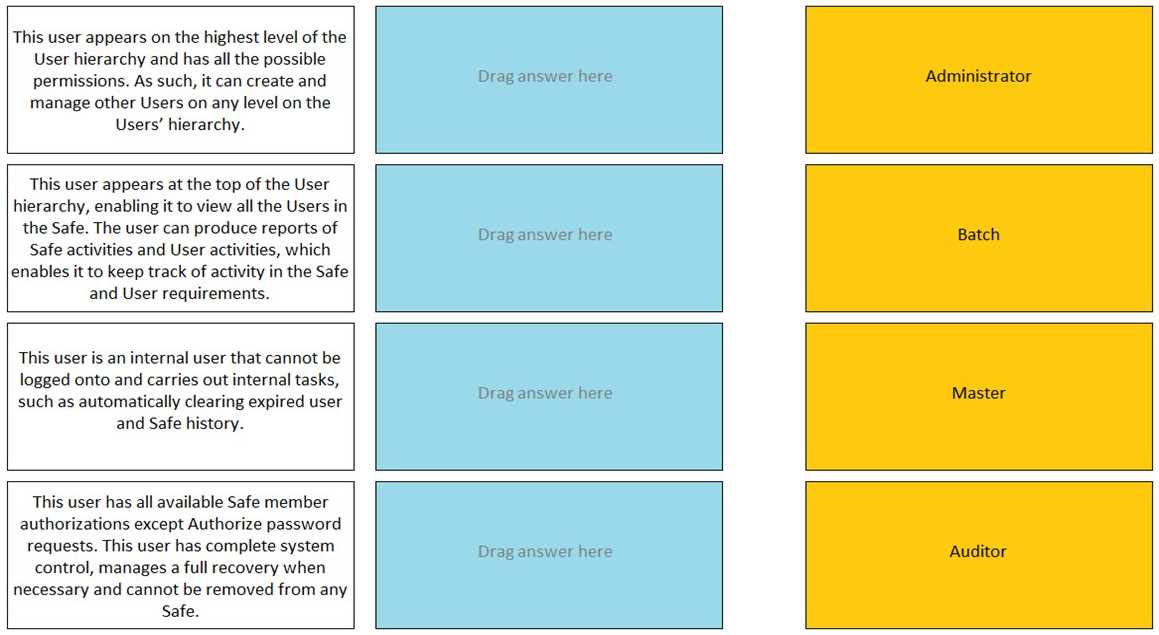
DRAG DROP Match the built-in Vault User with the correct definition. CyberArk PAM DEF question

Drag & Drop
Q: 2
Via Password Vault Web Access (PVWA), a user initiates a PSM connection to the target Linux machine using RemoteApp. When the client’s machine makes an RDP connection to the PSM server, which user will be utilized?
Options
Q: 3
As long as you are a member of the Vault Admins group you can grant any permission on any safe.
Options
Q: 4
Which utilities could you use to change debugging levels on the vault without having to restart the vault. Select all that apply.
Options
Q: 5
Which change could CyberArk make to the REST API that could cause existing scripts to fail?
Options
Q: 6
Can the 'Connect' button be used to initiate an SSH connection, as root, to a Unix system when SSH access for root is denied?
Options
Q: 7

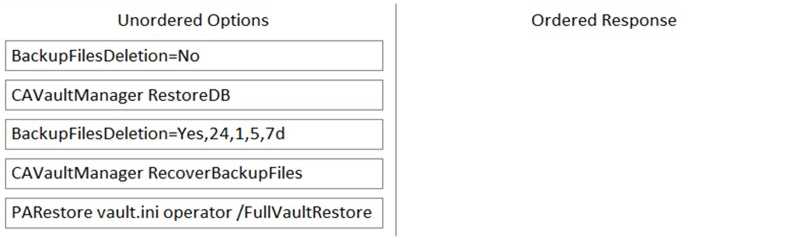
DRAG DROP Arrange the steps to restore a Vault using PARestore for a Backup in the correct sequence. CyberArk PAM DEF question

Drag & Drop
Q: 8

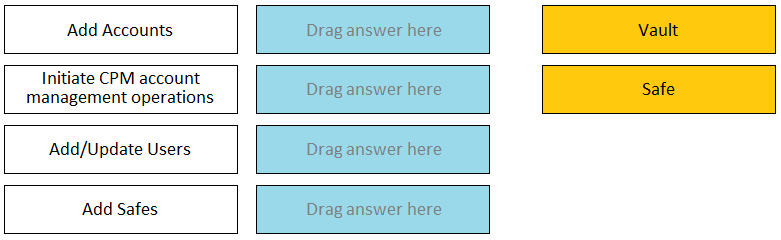
DRAG DROP Match each permission to where it can be found. CyberArk PAM DEF question

Drag & Drop
Q: 9
It is possible to restrict the time of day, or day of week that a [b]reconcile[/b] process can occur
Options
Q: 10
Customers who have the ‘Access Safe without confirmation’ safe permission on a safe where accounts are configured for Dual control, still need to request approval to use the account.
Options
Q: 11

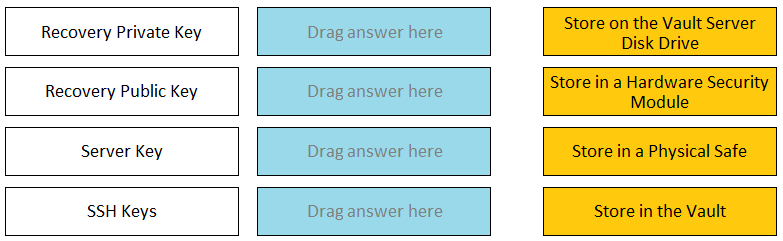
DRAG DROP Match each key to its recommended storage location. CyberArk PAM DEF question

Drag & Drop
Q: 12
When the CPM connects to a database, which interface is most commonly used?
Options
Q: 13
You want to give a newly-created group rights to review security events under the Security pane. You also want to be able to update the status of these events. Where must you update the group to allow this?
Options
Q: 14
A Logon Account can be specified in the Master Policy.
Options
Q: 15
Which onboarding method would you use to integrate CyberArk with your accounts provisioning process?
Options
Q: 16
Which parameter controls how often the CPM looks for Soon-to-be-expired Passwords that need to be changed.
Options
Q: 17

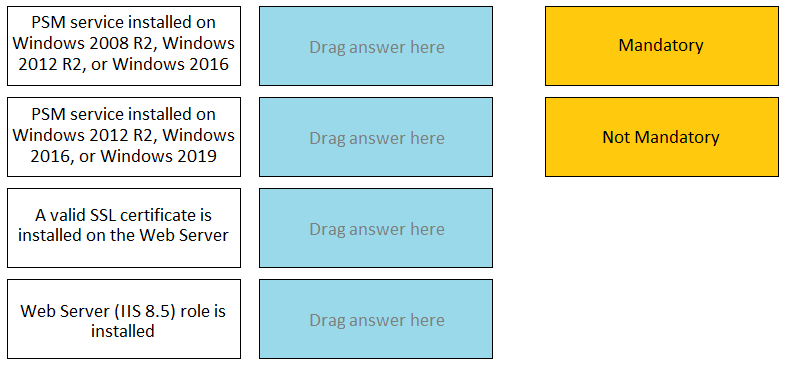
DRAG DROP For each listed prerequisite, identify if it is mandatory or not mandatory to run the PSM Health Check. CyberArk PAM DEF question

Drag & Drop
Q: 18
By default, members of which built-in groups will be able to view and configure Automatic Remediation and Session Analysis and Response in the PVWA?
Options
Q: 19
When Dual Control is enabled a user must first submit a request in the Password Vault Web Access (PVWA) and receive approval before being able to launch a secure connection via PSM for Windows (previously known as RDP Proxy).
Options
Q: 20
You want to generate a license capacity report. Which tool accomplishes this?
Options
Question 1 of 20

What's covered in this practice questions set

3: Privileged Account Security Administration · 11 questions

📖 About this Domain

This domain focuses on the core administrative functions within the CyberArk Privileged Access Management solution. It covers the day-to-day operational tasks for managing Safes, platforms, and user access to privileged accounts. These are the fundamental procedures for maintaining the CyberArk Digital Vault.

🎓 What You Will Learn

  • You will learn to create and configure Safes, manage Safe members, and define object-level access controls.
  • You will learn to manage platforms, including duplicating existing platforms and configuring settings for CPM and PSM.
  • You will learn to integrate with directory services like LDAP for user and group provisioning.
  • You will learn methods for onboarding privileged accounts, including manual addition and using the Accounts Discovery feature.

🛠️ Skills You Will Build

  • You will build the skill to perform daily administrative tasks in the PVWA and PrivateArk Client.
  • You will gain proficiency in configuring granular permissions for users and groups on Safes and accounts.
  • You will develop the ability to manage and apply Master Policy settings and platform-level policies.
  • You will learn to troubleshoot common issues related to account onboarding and platform management.

💡 Top Tips to Prepare

  • Master the specific authorizations available for Safe members as these are critical and frequently tested concepts.
  • Practice the process of duplicating and modifying a platform in the PVWA to understand all associated parameters.
  • Understand the differences between user provisioning from an LDAP directory versus creating local CyberArk users.
  • Focus on the required and optional properties for onboarding different types of accounts via various platforms.

4: Privileged Session Manager · 4 questions

📖 About this Domain

This domain covers the Privileged Session Manager (PSM) component of the CyberArk Core PAS solution. PSM provides secure session isolation, real-time monitoring, and detailed recording of all privileged user activities. It acts as a jump server or proxy to prevent direct connections to target systems and mitigate malware risks.

🎓 What You Will Learn

  • Understand the PSM architecture, including the roles of the PSM server, PSM for SSH, and their integration with the Vault and PVWA.
  • Learn to configure and manage PSM connection components for various target systems like Windows, UNIX, and databases.
  • Explore session management policies for controlling session recording, live monitoring, and privileged threat analytics.
  • Grasp PSM hardening procedures using AppLocker and how to troubleshoot common session connectivity issues using logs.

🛠️ Skills You Will Build

  • Deploying and configuring PSM servers and connection components for diverse target platforms.
  • Implementing granular session control policies through the Master Policy and platform settings.
  • Analyzing PSM session recordings and audit logs for forensic investigation and compliance reporting.
  • Troubleshooting PSM session initiation failures by interpreting PSM logs and connection flow.

💡 Top Tips to Prepare

  • Memorize the detailed PSM session initiation workflow for both RDP and SSH connections.
  • Gain hands-on experience with configuring universal connectors and modifying connection component parameters.
  • Focus on the purpose and implementation of the PSM hardening script and AppLocker rules.
  • Familiarize yourself with the location and content of key log files like PMTrace for effective troubleshooting.

2: Privileged Account Security Implementation · 3 questions

📖 About this Domain

This domain covers the hands-on implementation of the CyberArk Privileged Account Security (PAS) solution. It focuses on the technical procedures for installing, hardening, and configuring core components like the Vault, CPM, PSM, and PVWA. The objective is to build a functional and secure PAS environment.

🎓 What You Will Learn

  • You will learn the end-to-end Vault installation process, including server hardening, post-install configurations, and disaster recovery user setup.
  • You will learn to deploy and register the Central Policy Manager (CPM) and Privileged Session Manager (PSM) to manage and monitor privileged accounts.
  • You will learn the configuration of the Password Vault Web Access (PVWA) for user interaction and the integration with authentication methods like LDAP.
  • You will learn the initial steps of creating safes and onboarding privileged accounts to establish a baseline for credential management.

🛠️ Skills You Will Build

  • You will build the skill to deploy a complete CyberArk PAS infrastructure following documented best practices.
  • You will build proficiency in hardening the Digital Vault and other components to secure the PAS solution itself.
  • You will build the ability to configure component integration, ensuring proper communication between the Vault, PVWA, CPM, and PSM.
  • You will build competence in performing initial system configuration through the PVWA, including Master Policy settings and platform management.

💡 Top Tips to Prepare

  • Focus on the specific steps and sequence detailed in the official CyberArk PAS Installation Guide for each component.
  • Memorize the default ports and communication paths between all PAS components as these are frequent exam topics.
  • Build a lab environment to practice the installation and hardening procedures repeatedly until they become second nature.
  • Understand the roles and permissions of built-in users like Master, Administrator, and Auditor during the implementation phase.

1: CyberArk Privileged Access Manager Solution · 1 questions

📖 About this Domain

This domain introduces the core architecture of the CyberArk Privileged Access Manager (PAM) solution. It details the primary components, their specific functions, and how they interact to secure privileged credentials and sessions within an enterprise environment.

🎓 What You Will Learn

  • You will learn the roles and responsibilities of core components like the Digital Vault, PVWA, CPM, and PSM.
  • You will understand the secure communication flows and protocols used between all PAM components.
  • You will identify the key capabilities of Privileged Session Manager (PSM) for session isolation, monitoring, and control.
  • You will recognize the function of the Central Policy Manager (CPM) in automating password and key rotation.

🛠️ Skills You Will Build

  • You will build the skill to describe the multi-layered security of the Digital Vault, including encryption and authentication.
  • You will develop the ability to map privileged access security requirements to specific CyberArk component functionalities.
  • You will gain competency in articulating the end-to-end workflow of a privileged session from authentication to termination.
  • You will build the skill to identify the purpose of internal users like PSMConnect, PSMAdminConnect, and Gateway users.

💡 Top Tips to Prepare

  • Memorize the default ports and communication directions between the Vault, PVWA, CPM, PSM, and target systems.
  • Focus on the logical architecture diagrams provided in official CyberArk documentation to visualize component interaction.
  • Understand the specific roles of the PSM for Windows versus the PSM for SSH components.
  • Drill down on the CPM password management process, including verification and reconciliation phases.

5: Privileged Threat Analytics · 1 questions

📖 About this Domain

This domain covers CyberArk Privileged Threat Analytics (PTA), the component that detects and alerts on anomalous privileged user behavior. PTA leverages machine learning and behavioral analytics to identify credential theft, lateral movement, and other indicators of compromise. It is a core element for proactive threat detection within the CyberArk PAM solution.

🎓 What You Will Learn

  • Understand the PTA architecture, including the PTA Server, PTA Windows Agent, and Network Sensor components.
  • Learn how PTA integrates with the Vault, PVWA, PSM, and third-party SIEM systems for data collection and event forwarding.
  • Identify the different security events and threat detection algorithms PTA uses to baseline normal activity and detect deviations.
  • Explore the PTA dashboard for investigating security incidents, analyzing risk scores, and initiating remediation actions.

🛠️ Skills You Will Build

  • Ability to deploy and configure the PTA server and its associated agents within a CyberArk environment.
  • Skill in analyzing PTA security events to distinguish between false positives and genuine threats to privileged accounts.
  • Competency in tuning PTA detection policies and configuring automated responses like session termination or account suspension.
  • Proficiency in integrating PTA with SIEM solutions for centralized security monitoring and incident response workflows.

💡 Top Tips to Prepare

  • Memorize the data flow between the Vault, PSM, PTA Server, and SIEM to understand how events are captured and analyzed.
  • Focus on the key detection categories, such as credential theft, irregular privileged activity, and suspicious password access.
  • Practice interpreting the PTA security events dashboard and understand the meaning of different risk scores and alert severities.
  • Know the specific configuration files and parameters for PTA, such as systemparm.properties and the localparm.ini.

Premium Access Includes

  • Quiz Simulator
  • Exam Mode
  • Progress Tracking
  • Question Saving
  • Flash Cards
  • Drag & Drops
  • 3 Months Access
  • PDF Downloads
Get Premium Access
Scroll to Top