Free 200-301 Practice Test Questions and Answers (2026)

View Mode
Q: 1

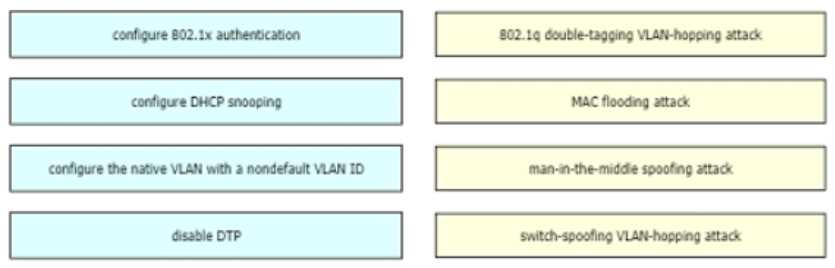
DRAG DROP Drag and drop the attack-mitigation techniques from the left onto the Types of attack that they mitigate on the right. Cisco CCNA 200-301 question

Drag & Drop
29 comments in the community discussion
6
native VLAN nondefault → double-tagging, 802.1x auth → MAC flooding, DHCP snooping → MITM, disable DTP → switch-spoofing. Looks right to me since port-security's not an option for MAC flooding. Anyone see this set up differently?
5
Had something like this in a mock. Mapping is: native VLAN with nondefault VLAN ID -> double-tagging, 802.1x authentication -> MAC flooding, DHCP snooping -> man-in-the-middle spoofing, disable DTP -> switch-spoofing. That lines up with Cisco official materials from what I remember. Pretty sure that's right
Q: 2

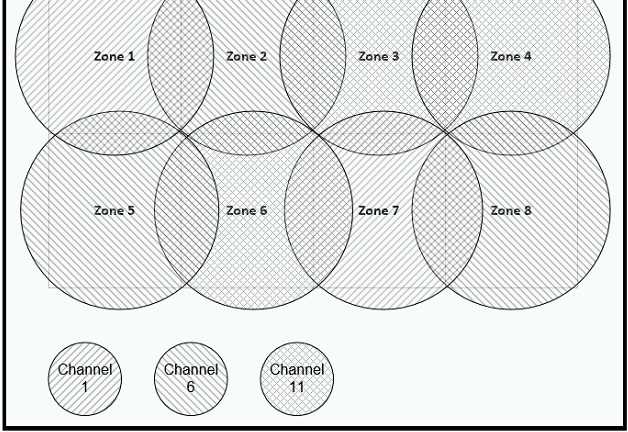
Refer to the exhibit. Cisco CCNA 200-301 question Between which zones do wireless users expect to experience intermittent connectivity?
Options
31 comments in the community discussion
2
D
1
Option D fits here. Zones 3 and 6 are both shaded the same way on the diagram, which usually means they're set to the same WiFi channel. That's a classic setup for cochannel interference, leading to intermittent connections as devices fight for airtime. I see why some might pick C, but that one's a trap since those
Q: 3

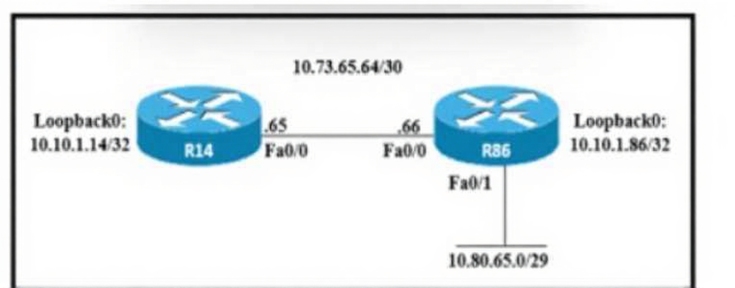
Refer to the exhibit.

An engineer must configure a floating static route on an external EIGRP network. The destination subnet is the /29 on the LAN Interface of R86. Which command must be executed on R14?

Options
43 comments in the community discussion
2
Option D
2
I don’t think it’s C, the mask in D looks more like what I’d expect for this subnet. C’s values seem off based on how these floating static routes usually show up in lab sims.
Q: 4
Which protocol must be implemented to support separate authorization and authentication solutions for wireless APs?
Options
32 comments in the community discussion
2
Its B here. TACACS+ actually splits up authentication and authorization, so you can manage them separately. RADIUS doesn't really do that, it mixes both steps together. Pretty sure that's what they're asking for, but open to other takes if I missed something.
1
Check the official CCNA guide for this, pretty sure it's B.
Q: 5
What is a function of the Cisco DNA Center Overall Health Dashboard?
Options
35 comments in the community discussion
6
Option A makes the most sense. The overall health dashboard in DNA Center shows top issues across the whole network, not individual device logs or CPU stats. Official guides and a few practice tests mention this "top 10 global issues" summary feature pretty often. Someone correct me if I missed something!
1
A tbh, C is tempting but the dashboard is about top global issues, not just wireless status.
Q: 6
Which command entered on a switch configured with Rapid PVST* listens and learns for a specific time period?
Options
40 comments in the community discussion
6
Yeah, D forward-time sets how long a port stays in listening and learning. That's exactly what the question is about, not BPDU hello intervals. Pretty sure this is right unless I'm missing some nuance.
6
Doesn’t forward-time specifically set how long a port spends in listening and learning for STP/Rapid PVST? I’ve seen similar wording pop up on exam reports. Just want to double-check I’m not mixing it up with hello-time here.
Q: 7
It work security team noticed that an increasing number of employees are becoming victims of phishing attacks. Which security program should be implemented to mitigate the problem?
Options
38 comments in the community discussion
6
My pick: D, unless the question means technical only but phishing is a user problem first. If the attack was malware via USB I'd rethink but here user awareness training flips the outcome.
5
Option D that’s the main one for phishing since it targets the user side.
Q: 8

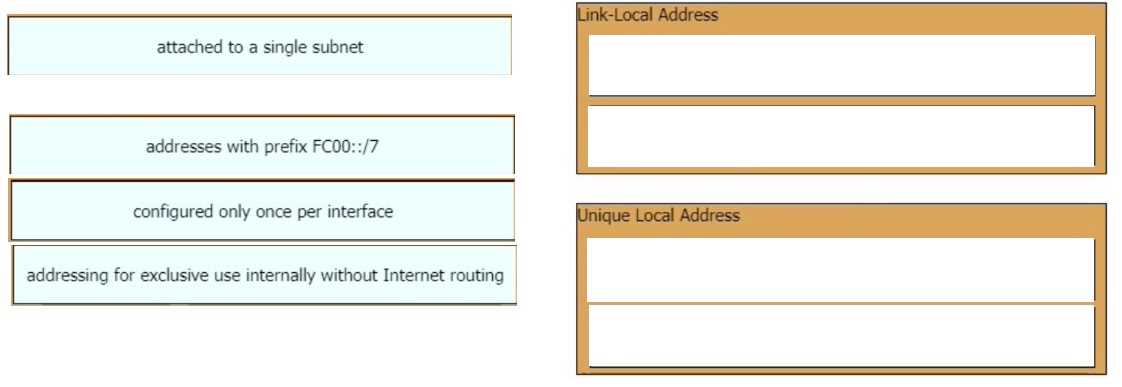
DRAG DROP Drag and drop the IPv6 address type characteristics from the left to the right. Cisco CCNA 200-301 question

Drag & Drop
33 comments in the community discussion
5
Be careful with "configured only once per interface". That's what usually trips people up on link-local. For the mapping: attached to a single subnet, configured only once per interface goes with Link-Local. FC00::/7 prefix, exclusive internal use is for Unique Local. If Cisco ever lets you do more than one link-loc
4
Makes sense to me: Link-Local sits with "attached to a single subnet" and "configured only once per interface", since it's only good for local link comms and you only get one per NIC. Unique Local's the one with FC00::/7 and "exclusive use internally" for private site traffic. Anyone see it differently?
Q: 9

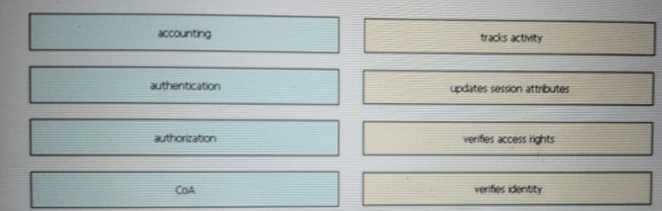
DRAG DROP Drag and drop the AAA terms from the left onto the description on the right. Cisco CCNA 200-301 question

Drag & Drop
28 comments in the community discussion
6
tracks activity → accounting, updates session attributes → COA, verifies access rights → authorization, verifies identity → authentication. I think this is right based on how AAA is usually mapped. COA is a bit of a trap for the authorization slot here.
6
tracks activity → accounting, updates session attributes → COA, verifies access rights → authorization, verifies identity → authentication. Some might mix up COA with accounting here, but COA is about making live session changes, not logging them. Seen this same mapping in several Cisco study guides-correct me if you s
Q: 10

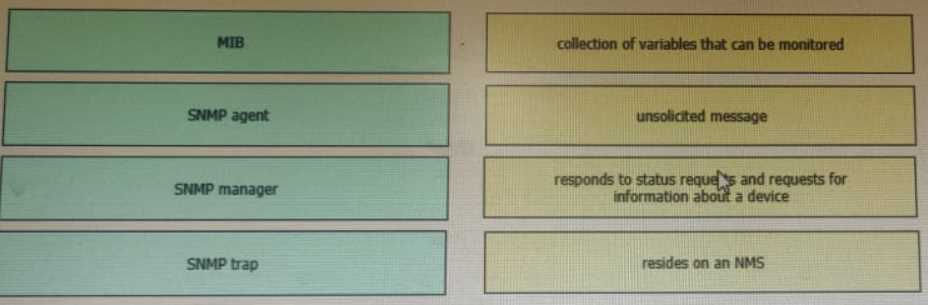
DRAG DROP Drag and drop the SNMP components from the left onto the descriptions on the right. Cisco CCNA 200-301 question

Drag & Drop
28 comments in the community discussion
7
MIB to collection of variables, SNMP trap to unsolicited message, agent responds, manager on NMS. Practice with official lab.
5
Nah, I don’t think agent goes with unsolicited message. Should be: MIB to variables, trap to unsolicited, agent responds, manager on NMS.
Q: 11

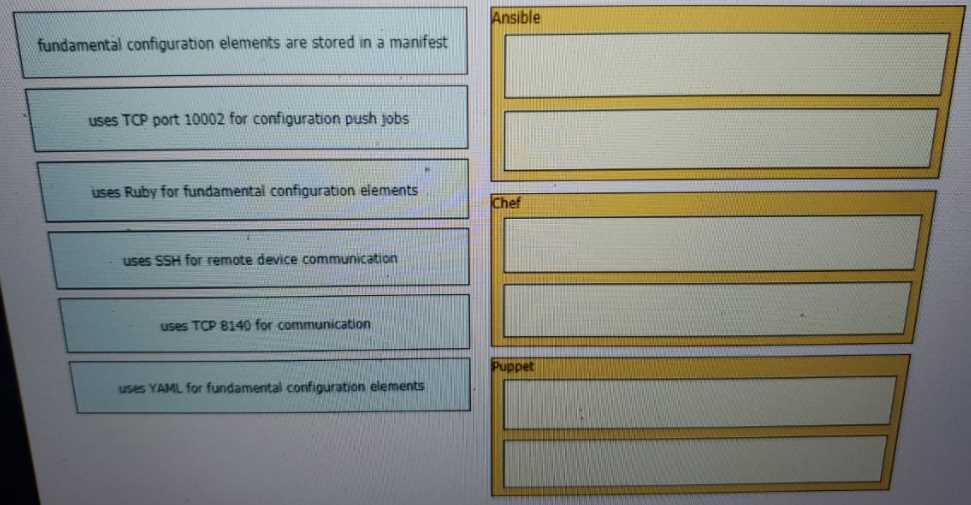
DRAG DROP Drag and drop the descriptions from the left onto the configuration-management technologies on the right. Cisco CCNA 200-301 question

Drag & Drop
5 comments in the community discussion
3
Ansible: SSH/YAML, Chef: 10002/Ruby, Puppet: manifest/8140. I’ve matched these the same way in labs and practice sets, so pretty confident.
3
Saw a similar drag and drop on my practice exam. Ansible is SSH/YAML, Chef is Ruby/10002, Puppet gets manifest/8140. Pretty sure this lines up with official docs too but happy to be corrected if I missed something.
Q: 12
Which IPv6 address block sends packets to a group address rather than a single address?
Options
6 comments in the community discussion
1
Probably D here. FF00::/8 is the multicast range for IPv6, so it fits the group address part. C might look tempting since FE80::/10 is common, but that's only for link-local traffic, not multicast.
1
D imo, FF00::/8 is the multicast block for IPv6. C (FE80::/10) is link-local, not group/multicast. Pretty sure the question wants multicast specifically, so D makes sense here. Anyone disagree?
Q: 13
How do traditional campus device management and Cisco DNA Center device management differ in regards to deployment?
Options
6 comments in the community discussion
Its D. With Cisco DNA Center you get automation tools like ZTP and PnP, so devices can be rolled out way faster versus doing everything manually in the traditional model. Saw similar wording in practice exams, pretty sure about this one.
D imo. DNA Center automates deployment with features like Zero-Touch Provisioning and Plug and Play, so it gets networks up way faster than old-school manual CLI setup. C is tempting but scale isn't always quicker with traditional methods, especially without automation. Feel free to disagree but pretty sure D matches C
Q: 14

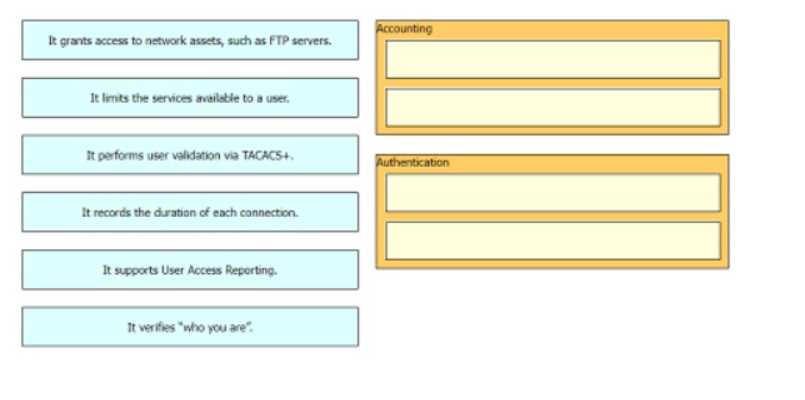
DRAG DROP Drag and drop the statements about AAA services firm the left onto the corresponding AAA services on the right Not all options are used. Cisco CCNA 200-301 question

Drag & Drop
8 comments in the community discussion
6
Nah, "It performs user validation via TACACS+" and "It verifies 'who you are'" both fit Authentication, not Accounting. Accounting is about tracking stuff like session duration and reporting. Easy to mix them up here!
6
Accounting: records duration, supports user access reporting. Authentication: TACACS+ user validation, verifies who you are.
Q: 15

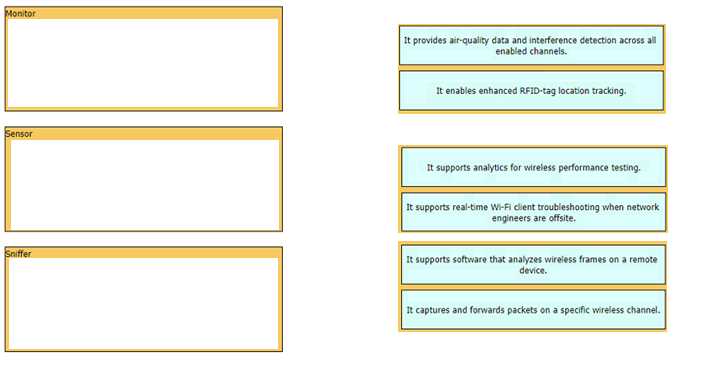
DRAG DROP Drag and drop the statements about access-point modes from the left onto the corresponding modes on the right. Cisco CCNA 200-301 question

Drag & Drop
7 comments in the community discussion
4
Watch out for that “all enabled channels” phrase, that's what makes it Monitor mode not Sniffer. If it asked about a specific channel, then Sniffer would be right. These small wording shifts totally flip the answer here.
3
Yeah, Monitor mode is the one scanning all channels for air quality and interference, while Sniffer works just on a specific channel for detailed frame analysis. Sensor mode’s about analytics and troubleshooting. That’s how I remember it, but open to debate if anyone sees it different.
Q: 16
What differentiates the Cisco OfficeExtend AP mode from FlexConnect AP mode?
Options
7 comments in the community discussion
Question trips some people up if they forget FlexConnect does local switching-OfficeExtend always tunnels. C
Its C, official guide and Cisco exam blueprints call out the tunnel vs local switch difference.
Q: 17

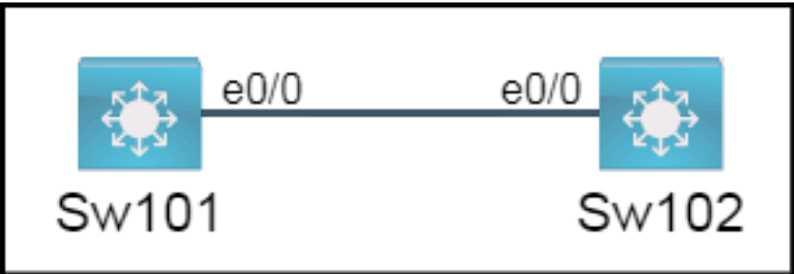
SIMULATION All physical cabling is in place. A company plans to deploy 32 new sites. The sites will utilize both IPv4 and IPv6 networks. 1 . Subnet 172.25.0.0/16 to meet the subnet requirements and maximize the number of hosts Using the second subnet • Assign the first usable IP address to e0/0 on Sw1O1 • Assign the last usable IP address to e0/0 on Sw102 2. Subnet to meet the subnet requirements and maximize the number of hosts c Using the second subnet • Assign an IPv6 GUA using a unique 64-Bit interface identifier on e0/0 on Sw101 • Assign an IPv6 GUA using a unique 64-Bit interface identifier on eO/O on swi02 Guidelines This is a lab item in which tasks will be performed on virtual devices. • Refer to the Tasks tab to view the tasks for this lab item. • Refer to the Topology tab to access the device console(s) and perform the tasks. • Console access is available for all required devices by clicking the device icon or using the tab(s) above the console window. • All necessary preconfigurations have been applied. • Do not change the enable password or hostname for any device. • Save your configurations to NVRAM before moving to the next item. • Click Next at the bottom of the screen to submit this lab and move to the next question. • When Next is clicked, the lab closes and cannot be reopened. Cisco CCNA 200-301 question

Your Answer
11 comments in the community discussion
3
172.25.8.1 for Sw101 and 172.25.15.254 for Sw102, pretty sure that's right but the IPv6 threw me off, can anyone confirm?
1
Could you use 172.25.8.2 for Sw101 instead of .1? Saw a similar practice question with that answer.
Q: 18
Which type of attack can be mitigated by dynamic ARP inspection?
Options
8 comments in the community discussion
3
Option D
1
D tbh
Q: 19
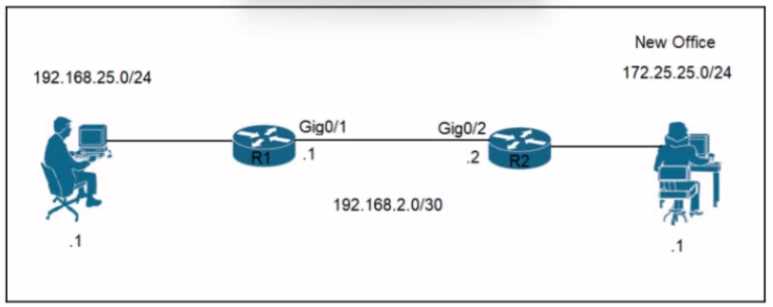
Refer to the exhibit. Cisco CCNA 200-301 question A network engineer is updating the configuration on router R1 to connect a new branch office to the company network R2 has been configured correctly. Which command must the engineer configure so that devices at the new site communicate with the main office?
Options
7 comments in the community discussion
I’d say C, matches what you'd see in both official guides and labs. CCNA practice exams usually show this exact static route format.
Nah, I'm picking A here since it looks more like a valid static route than B.
Q: 20
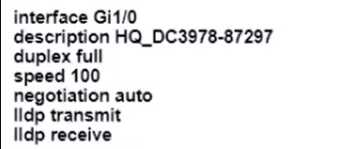
An engineer configures interface Gi1/0 on the company PE router to connect to an ISP Neighbor discovery is disabled Cisco CCNA 200-301 question Which action is necessary to complete the configuration if the ISP uses third-party network devices?
Options
17 comments in the community discussion
1
Yep, has to be A here. LLDP needs to be enabled globally so it’ll actually work on the interface with third-party gear. Interface-level lldp commands don’t do anything unless you do lldp run. Pretty sure that’s the main point, but let me know if I missed something.
A or D? Leaning A because LLDP has to be enabled globally or interface settings don't take effect, but some labs and guides mention LLDP-MED with certain third-party setups. If you're prepping for the CCNA, check the official book and play with this in a lab to be sure.
Question 1 of 20

What's covered in this practice questions set

5: Security Fundamentals, · 6 questions

📖 About this Domain

This domain covers fundamental security concepts, threats, and vulnerabilities. It focuses on implementing security on network devices to maintain integrity, confidentiality, and availability. You will learn to configure basic security features on Cisco routers, switches, and wireless LAN controllers.

🎓 What You Will Learn

  • You will learn to define key security concepts like threats, vulnerabilities, exploits, and mitigation techniques.
  • You will learn to configure and verify access control lists (ACLs) to filter network traffic based on specific criteria.
  • You will learn to implement Layer 2 security features such as port security, DHCP snooping, and dynamic ARP inspection.
  • You will learn to configure a secure wireless LAN (WLAN) using WPA2 Pre-Shared Key (PSK) on a Wireless LAN Controller (WLC).

🛠️ Skills You Will Build

  • You will build the skill to secure device access using local passwords and understand AAA concepts.
  • You will build the skill to mitigate common Layer 2 attacks by configuring switch security features.
  • You will build the skill to implement traffic filtering policies using standard and extended ACLs.
  • You will build the skill to deploy a secure wireless network using current security protocols like WPA2 and WPA3.

💡 Top Tips to Prepare

  • Master the configuration and verification of both standard and extended ACLs, including proper placement.
  • Practice configuring port security, DHCP snooping, and DAI in a lab environment to understand their operational states.
  • Differentiate clearly between the concepts of authentication, authorization, and accounting (AAA).
  • Understand the purpose and configuration of site-to-site VPNs and remote access VPNs at a conceptual level.

2: Network Access, · 4 questions

📖 About this Domain

This domain focuses on Layer 2 technologies for wired and wireless network access. You will cover switch configuration, VLANs, trunking, Spanning Tree Protocol, and fundamental wireless LAN controller concepts.

🎓 What You Will Learn

  • Configure VLANs and 802.1Q trunks to segment broadcast domains across multiple switches.
  • Implement Layer 2 discovery protocols like CDP and LLDP for network device mapping.
  • Describe Rapid PVST+ operations, including root bridge election and port states, to prevent switching loops.
  • Configure a basic wireless LAN using a WLC GUI, including security settings like WPA2 PSK.

🛠️ Skills You Will Build

  • Configure switch access ports for data/voice VLANs and trunk ports for interswitch connectivity.
  • Bundle physical links into a logical EtherChannel using LACP for increased bandwidth and redundancy.
  • Verify Layer 2 operations using show commands to troubleshoot VLANs, trunks, and STP.
  • Deploy a secure WLAN for client access through a wireless LAN controller's graphical user interface.

💡 Top Tips to Prepare

  • Master the configuration and verification of VLANs and 802.1Q trunks as they are fundamental to switched networks.
  • Practice identifying STP port roles like Root Port and Designated Port in a given topology.
  • Differentiate between the proprietary Cisco Discovery Protocol and the vendor-neutral LLDP.
  • Familiarize yourself with the WLC GUI for creating a WLAN, as practical configuration is tested.

4: IP Services, · 4 questions

📖 About this Domain

This domain focuses on the IP services that support network functionality, management, and operations. It covers the configuration and verification of critical protocols like NAT, DHCP, and NTP. You will also learn the theory behind network monitoring and management services.

🎓 What You Will Learn

  • You will learn to configure and verify inside source Network Address Translation (NAT) using static assignments and dynamic pools.
  • You will learn the operational theory and configuration of DHCP, DNS, NTP, SNMP, and syslog for network support and management.
  • You will learn to configure secure remote access using SSH and understand the role of TFTP/FTP for file management.
  • You will learn to describe Quality of Service (QoS) concepts, including per-hop behavior (PHB) for traffic management.

🛠️ Skills You Will Build

  • You will build the skill to configure a router as a DHCP client and a DHCP relay agent.
  • You will gain the ability to implement both static NAT and Port Address Translation (PAT) on a Cisco router.
  • You will develop the skill to configure SSH on a Cisco IOS device for secure remote administration.
  • You will be able to explain the functions of key IP services like NTP, SNMP, and syslog in a production network.

💡 Top Tips to Prepare

  • Use a network simulator to practice the command-line configuration for NAT, DHCP relay, and SSH repeatedly.
  • Create flashcards to memorize the specific functions and differences between SNMP, syslog, DHCP, and DNS.
  • Focus on understanding the conceptual steps of QoS PHB, such as classification, marking, and queuing, rather than deep configuration.
  • Master the verification commands like 'show ip nat translations' and 'show ntp status' to troubleshoot IP service configurations.

6: Automation and Programmability · 3 questions

📖 About this Domain

This domain introduces the fundamental concepts of network automation and programmability. It explains the shift from traditional CLI-based management to modern, controller-based architectures and the use of APIs for network operations.

🎓 What You Will Learn

  • You will learn to compare traditional networks with controller-based networking, including the separation of the control plane and data plane.
  • You will learn to describe software-defined architectures such as overlay, underlay, and fabric, along with the function of northbound and southbound APIs.
  • You will learn the characteristics of REST-based APIs, including CRUD operations, HTTP verbs, and data encoding.
  • You will learn to recognize the capabilities of configuration management tools like Puppet, Chef, and Ansible.

🛠️ Skills You Will Build

  • You will build the skill to differentiate between traditional device management and Cisco DNA Center enabled management.
  • You will build the skill to interpret basic JSON encoded data structures used in network automation.
  • You will build the skill to explain core SDN concepts and the role of APIs in a controller-based architecture.
  • You will build the skill to identify the purpose of common configuration management mechanisms.

💡 Top Tips to Prepare

  • Focus on the conceptual purpose of automation tools and APIs, not on writing code.
  • Memorize the definitions and functions of REST API components like HTTP verbs and CRUD operations.
  • Clearly understand the relationship between underlay, overlay, control plane, and data plane in an SDN model.
  • Practice interpreting simple JSON data structures to identify key-value pairs.

3: IP Connectivity, · 3 questions

📖 About this Domain

The IP Connectivity domain covers fundamental routing concepts and router operations. You will learn how routers build their routing tables and make packet forwarding decisions. This section emphasizes both static routing and the configuration of single-area OSPFv2.

🎓 What You Will Learn

  • Interpret routing table components, including route source, administrative distance, and metric.
  • Understand the router's forwarding decision process, including the longest prefix match rule.
  • Configure and verify IPv4 and IPv6 static routes, including default, network, and floating static routes.
  • Implement and verify single-area OSPFv2, including neighbor adjacencies and router ID election.

🛠️ Skills You Will Build

  • Analyze an IP routing table to determine the best path for a given destination network.
  • Implement static routing in a small network to provide point-to-point and default connectivity.
  • Configure OSPFv2 routing on Cisco IOS routers to establish dynamic routing within a single area.
  • Verify routing protocol operations and troubleshoot basic IP connectivity issues using show commands.

💡 Top Tips to Prepare

  • Use Cisco Packet Tracer or GNS3 to lab static routing and OSPFv2 configurations extensively.
  • Master the router's packet forwarding logic, focusing on administrative distance and the longest prefix match.
  • Memorize key verification commands like 'show ip route', 'show ip ospf neighbor', and 'show ip protocols'.
  • Understand the purpose and concepts behind First Hop Redundancy Protocols (FHRP) like HSRP.

1: Network Fundamentals,

📖 About this Domain

This domain covers foundational network components, architectures, and protocols. You will learn about the OSI and TCP/IP models, IP addressing, and the physical layer. It establishes the core knowledge required for all other networking topics.

🎓 What You Will Learn

  • Explain the roles of network components like routers, L2/L3 switches, and access points in various network topologies.
  • Configure and verify IPv4 subnetting and IPv6 addressing schemes, including GUA and LLA.
  • Compare the TCP/IP and OSI models and describe the data encapsulation process through protocol data units (PDUs).
  • Identify cabling types, such as UTP and fiber, and troubleshoot physical layer issues like collisions and duplex mismatches.

🛠️ Skills You Will Build

  • Differentiating between network devices and architectures like spine-leaf, WAN, and SOHO.
  • Calculating IPv4 subnets using CIDR notation and VLSM for efficient address allocation.
  • Configuring IPv4 and IPv6 static addressing on client and router interfaces.
  • Verifying Layer 1 connectivity and identifying issues with cabling and interface status.

💡 Top Tips to Prepare

  • Master IPv4 subnetting and summarization through daily practice until it is second nature.
  • Memorize the OSI and TCP/IP layers, their functions, and the corresponding PDUs like frames, packets, and segments.
  • Utilize Cisco Packet Tracer to build simple topologies and visualize data flow with ARP, ICMP, and TCP/UDP.
  • Learn Ethernet cabling standards, including pinouts for straight-through and crossover cables, and when to use each.

Premium Access Includes

  • Quiz Simulator
  • Exam Mode
  • Progress Tracking
  • Question Saving
  • Flash Cards
  • Drag & Drops
  • 3 Months Access
  • PDF Downloads
Get Premium Access
Scroll to Top

FLASH OFFER

Days
Hours
Minutes
Seconds

avail 10% DISCOUNT on YOUR PURCHASE